

Multi-location permit tracking is a centralized system that records every permit, license, expiration date, compliance document, and audit trail across all your business locations in one place. If you're running multiple stores, the core problem is identical: permits expire silently, inspections get missed, and no one person has a complete picture. Here's what to do right now:
- Scan your portfolio. List every active permit across all locations, including business licenses, health permits, fire inspections, and signage approvals.
- Build a critical-expiration list. Flag anything expiring soon. These are your immediate operational risks.
- Assign a permit owner. Every location needs one named person responsible for intake, renewals, and document uploads.
The sections below cover how centralized tracking works mechanically, which features matter most, how to implement it in 90 days, and where Vaultedai fits into that picture.
Table of Contents
- What does multi-location permit tracking actually mean?
- How multi-location permit tracking works in practice
- What features does a multi-location permit system need?
- What operational benefits does centralized tracking deliver?
- How do you implement multi-location permit tracking in 90 days?
- Spreadsheets vs. a centralized system: which one do you actually need?
- What permit types do multi-location operators need to track?
- How do you run permit management as a command center?
- Key Takeaways
- The real reason spreadsheet-based tracking fails at scale
- Vaultedai gives multi-location teams a compliance command center
What does multi-location permit tracking actually mean?
Permit tracking for multiple sites means more than keeping a shared spreadsheet. It means every location has its own permit register, mapped to its physical address, jurisdiction, and applicable regulatory bodies, and all of those registers roll up into a single dashboard your compliance team can act on.
Here's a concrete example. A restaurant group opening its twelfth location in a new county needs a business license from the city clerk, a health permit from the county health department, a certificate of occupancy from the building department, a fire inspection clearance from the fire marshal, and a signage permit from the zoning office. Each of those comes from a different agency, on a different timeline, with different renewal cycles. Without a centralized system, the operations manager is chasing five agencies by email while also managing the other eleven locations.
A centralized permit management system solves this by:
- Mapping each permit to a location code, address, permit type, and issuing jurisdiction
- Storing all documents with version history in one place
- Triggering renewal alerts before deadlines hit
- Maintaining an audit trail so any inspector or internal auditor can pull records instantly
Local building departments, county health agencies, and fire marshals each have their own portals and timelines. A good system accounts for that variance rather than assuming uniform rules.
How multi-location permit tracking works in practice
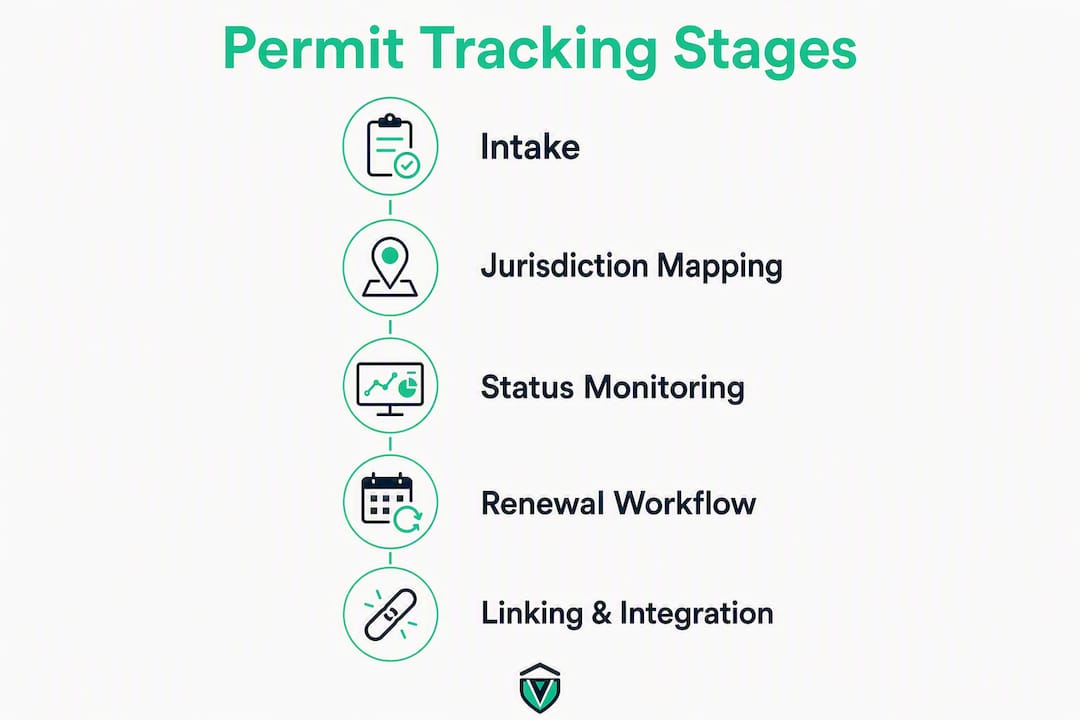
The core data flow runs in four stages: intake, jurisdiction mapping, status monitoring, and renewal workflow.

Intake is where a new permit enters the system. Someone uploads the permit document, enters the issue date, expiration date, permit number, and issuing agency, and tags it to a specific location. Some platforms auto-detect jurisdiction from the permit number itself and poll municipal portals nightly to update status without requiring manual logins to each city's website.
Jurisdiction mapping assigns a deterministic key to each record: location code + address + permit type + issuing agency. That combination prevents duplicate records and makes it possible to filter by region, permit type, or agency across hundreds of locations simultaneously.
Status monitoring tracks where each permit sits in its lifecycle: active, pending renewal, under review, expired, or flagged. Automated alerts set weeks before expiry are standard in purpose-built systems and represent the single biggest operational improvement over calendar reminders.
Renewal workflow kicks off automatically when a permit enters the pre-expiration window. The system routes a task to the assigned owner, attaches the relevant checklist for that jurisdiction, and logs every action taken.
Linking works the same way. A building permit ties to the contractor, the project, and the inspection schedule. When an inspection is completed, the record updates. When a contractor changes, the link updates. Every connection is traceable.
Pro Tip: Standardize your location naming convention before you import a single record. "Store 12," "Location 012," and "Chicago-Wicker Park" all refer to the same place, but three naming formats will create three separate records in most systems. Pick one format and enforce it from day one.
What features does a multi-location permit system need?
Not every platform built for single-location permitting scales to multi-site operations. When evaluating systems, require these capabilities:
- Central dashboard with per-location permit register. Every location's permits visible in one view, filterable by status, type, jurisdiction, and expiration window. A centralized dashboard replaces fragmented spreadsheets and email chains as the primary control point.
- Expiry alerts with configurable lead times. Alerts well in advance before expiration give teams enough runway to renew without rushing.
- Document storage with versioning. Per-permit document management with tagging, version history, and audit logs is a baseline requirement for any audit-ready operation.
- Jurisdiction-specific checklists. Requirements differ by city, county, and state. A checklist tied to the permit type and jurisdiction prevents missed steps during applications and renewals.
- Workflow automation. Renewal tasks, QC gates, and approval steps should route automatically rather than relying on someone remembering to send an email.
- Role-based access controls. Store managers see their location's permits. Regional managers see their territory. Compliance officers see everything. No one edits records they don't own.
- Audit trail. Every document upload, status change, and task completion is timestamped and attributed to a user. This is what makes a system audit-ready rather than just organized.
- Map or territory view. Geo-filtering and map views help field teams visualize permit status across a service area and plan inspection routes efficiently.
On integrations: the systems that deliver the most value connect to your ERP for cost tracking, your EHS platform for safety compliance, your facilities management tool for maintenance-linked permits, and your SSO provider for access management. Calendar and notification integrations (Slack, email, SMS) keep alerts from getting buried.

What operational benefits does centralized tracking deliver?
The benefits are real, but they're most convincing when paired with the specific risk each one eliminates.
- Reduced downtime. A missed business license renewal can trigger a temporary closure order from the city. Automated renewal workflows prevent that scenario entirely.
- Fewer fines and penalties. Operating on an expired health permit or fire inspection clearance carries financial penalties in most jurisdictions. A regulatory permit database organized by site, agency, and renewal cycle keeps teams audit-ready and avoids expired filings.
- Faster new-location rollouts. When permit templates and jurisdiction checklists already exist in the system, opening a new location in a familiar market takes hours to set up rather than days of research.
- Institutional knowledge retention. When a compliance manager leaves, their successor inherits a complete, organized record rather than a folder of PDFs and a half-maintained spreadsheet.
- Consistent renewals across all locations. Without a central system, renewal quality depends entirely on whoever manages each location. Centralized workflows enforce the same process everywhere.
The risks that centralized tracking mitigates most directly: a missed renewal leading to a temporary closure, a missing inspection record causing a failed compliance audit, and lost documents creating liability during a regulatory review. A pre-submission QC step, recommended as standard practice for multi-site permit management, reduces resubmittals and shortens permit cycle times by catching errors before they reach the agency.
For a deeper look at the benefits of centralized permit management, the operational case is straightforward: the cost of a system is almost always lower than the cost of one missed renewal at a high-revenue location.
How do you implement multi-location permit tracking in 90 days?
A phased rollout prevents the chaos of trying to migrate everything at once. Here's a practical 30/60/90-day structure.
Days 1–30: Triage and inventory
- Pull a complete list of every permit and license across all locations.
- Flag all permits nearing expiration as critical.
- Assign a permit owner to each location.
- Select a pilot region (prioritize jurisdictions where permit cycle times are longest or missed renewals have cost the most).
- Use a new location permit checklist to scope what each location actually holds.
Days 31–60: Pilot and SOPs
- Onboard the pilot region into the centralized system.
- Build jurisdiction-specific checklists for the pilot's permit types.
- Draft SOPs for intake, QC review, and renewal workflow.
- Run a QC gate on every imported record before going live.
- Train pilot-region staff and identify power users who will support the broader rollout.
Days 61–90: Full rollout and automation
- Migrate remaining locations in batches.
- Connect integrations (ERP, EHS, calendar/notification systems).
- Activate automated renewal alerts and workflow routing.
- Set KPI baselines: average permit cycle time, first-pass approval rate, cost per permit.
- Schedule a 30-day post-rollout review.
Roles and responsibilities
| Role | Responsibility |
|---|---|
| Permit Owner (per location) | Intake, document upload, renewal initiation |
| QC Reviewer (regional) | Pre-submission review, error flagging, approval gate |
| Jurisdiction Liaison | Agency communication, status follow-up, portal access |
| System Admin | User access, integrations, reporting, audit log review |
A small-to-mid rollout covering multiple locations typically requires one dedicated compliance coordinator and fractional time from regional managers during the pilot phase. Most teams complete the full migration within a few months when the pilot region is kept to a limited number of locations.
Pro Tip: Identify two or three power users in the pilot region before training begins. These are the people who will answer questions from their peers during the broader rollout. Their buy-in matters more than any training deck.
Spreadsheets vs. a centralized system: which one do you actually need?
Spreadsheets work until they don't. The honest answer is that they're fine for a single location or a very small portfolio with simple, infrequent renewals. The moment you cross into multi-jurisdiction complexity, they become a liability.
Spreadsheets and calendar reminders:
- Low setup cost, no vendor dependency
- High manual effort for updates and version control
- No audit trail, no document versioning, no automated alerts
- Renewal quality depends entirely on individual discipline
- Coverage gaps appear when staff turn over
Centralized permit management systems:
- Higher upfront cost and onboarding time
- Automated alerts, workflows, and document control
- Audit-ready by design, with full traceability
- Scales without adding headcount proportionally
- Coverage breadth varies by platform, so verify that your jurisdictions are supported before committing
Decision rule: If you manage multiple locations, hold permits across multiple jurisdictions, or have experienced missed renewals recently, a centralized system pays for itself. If you're at two or three locations with identical permit types and no cross-jurisdiction complexity, a well-maintained spreadsheet with calendar alerts is a reasonable interim solution.
Pro Tip: When piloting a centralized system, start with the region where a missed renewal would hurt most financially. An early win in a high-stakes market builds the internal case for full rollout faster than any ROI spreadsheet.
What permit types do multi-location operators need to track?
The list is longer than most operators expect. Common permit and license types across multi-location businesses include:
- Business/operating licenses (city and county level, often annual)
- Health permits (county health department, required for food service and personal care)
- Building and construction permits (for renovations, tenant improvements, new builds)
- Certificate of occupancy (required before opening or after major renovations)
- Fire inspection clearances (fire marshal, typically annual or biennial)
- Signage permits (zoning or planning department, often overlooked)
- Alcohol and tobacco licenses (state-level, with strict renewal deadlines)
- Environmental permits (for fuel storage, waste disposal, or emissions)
- Certificates of Insurance (COIs) (required by landlords and often tracked alongside permits)
- Specialty permits (STR licenses, food handler certifications, ADA compliance documentation)
Jurisdictional variance is the real complexity. A health permit in Travis County, Texas operates under different rules than one in Miami-Dade County, Florida. Austin's business license process differs from Miami's permitting workflow in both documentation requirements and renewal timelines. For operators managing state and local permits simultaneously, jurisdiction-specific checklists are the only reliable way to prevent missed steps.
Prioritize by operational risk. A lapsed health permit or business license can shut a location down immediately. A delayed signage permit is an inconvenience. Build your critical-expiration list accordingly, and use a fire inspection permit organization system as a model for how to structure high-risk permit categories.
How do you run permit management as a command center?
The shift from reactive record-keeping to a proactive command center is organizational, not just technological. Operations experts recommend treating the permit dashboard as the primary control point for multi-site compliance, replacing the fragmented mix of spreadsheets, email threads, and individual memory that most growing operators rely on.
A command-center model runs on six operational elements:
- Live dashboard showing permit status for every location, filterable by region, type, and expiration window
- Status alerts routed to the right person at the right time (90/60/30-day cadence)
- SOPs per jurisdiction so every renewal follows the same documented process regardless of who executes it
- QC gate before every submission to catch errors that cause rejections and delays
- Communication rhythm between system admin, regional managers, and jurisdiction liaisons (weekly during active renewal periods, monthly otherwise)
- KPI dashboard tracking average permit cycle time, first-pass approval rate, and cost per permit
Here's how an alert flows through a well-run command center: the system flags a health permit expiring in 60 days at a Chicago location. The alert routes to the regional manager, who assigns the renewal task to the location's permit owner. The permit owner completes the jurisdiction checklist, uploads the required documents, and submits the application. The QC reviewer confirms the submission is complete before it leaves the system. The regional manager gets a confirmation. If the city portal updates the status, the system captures it automatically.
Pro Tip: Track first-pass approval rate by jurisdiction. A low rate in a specific city usually signals a documentation gap in your checklist for that jurisdiction, not a staffing problem. Fix the checklist, and the approval rate follows.
Key Takeaways
Effective multi-site permit compliance requires a centralized system with automated alerts, jurisdiction-specific workflows, and clear role ownership at every location.
| Point | Details |
|---|---|
| Catalog permits immediately | Run a full portfolio scan and flag anything expiring within 90 days as a critical risk. |
| Assign named owners | Every location needs one person responsible for intake, renewals, and document uploads. |
| Pilot before full rollout | Start with the region where missed renewals carry the highest operational cost. |
| Enforce a QC gate | A pre-submission review step reduces resubmittals and shortens permit cycle times. |
| Vaultedai centralizes everything | Vaultedai gives multi-location teams a single dashboard, automated renewal alerts, and jurisdiction-specific checklists to replace spreadsheet-based tracking. |
The real reason spreadsheet-based tracking fails at scale
The conventional wisdom says spreadsheets fail because they're hard to maintain. That's true, but it misses the deeper problem: spreadsheets don't fail loudly. A missed renewal doesn't announce itself. The spreadsheet still looks fine. The calendar reminder fires, gets dismissed, and never fires again. The permit expires. The health inspector shows up three weeks later.
What actually breaks is the assumption that individual discipline can substitute for system-level accountability. It can't, not across ten locations, not across three. The moment a permit owner goes on vacation, changes roles, or simply has a bad week, the gap appears. And because there's no audit trail, no one knows the gap exists until it becomes a violation.
The objection I hear most often is cost. "We're not big enough for software yet." But the math usually runs the other way. One temporary closure at a mid-volume location costs more in lost revenue and remediation than a year of platform fees. The second most common objection is data migration: "We have years of records in spreadsheets." Most modern platforms handle bulk imports, and a 30-day pilot with one region sidesteps the migration anxiety entirely. You don't have to move everything at once.
The turning point for most operators isn't a technology decision. It's the first time a permit expires and someone has to explain to a regional VP why a location was closed for two days. After that conversation, the case for a centralized system writes itself.
Vaultedai gives multi-location teams a compliance command center
Operators who've read this far know what they need: a central dashboard, automated renewal alerts, document storage with audit trails, jurisdiction-specific checklists, and fast onboarding that doesn't require a six-month implementation project.
Vaultedai is built specifically for multi-location businesses that have outgrown spreadsheets, whether you're running a restaurant group, a franchise network, a convenience store chain, or a smoke shop portfolio. The platform centralizes permits, licenses, renewals, and compliance documents across every location, with AI-powered document extraction that pulls key data automatically so your team isn't re-entering information by hand. Onboarding is fast by design: most teams are tracking live permits within days, not months.
When you evaluate any permit management platform, ask these questions during the demo:
- Which jurisdictions are covered, and how quickly is coverage expanding?
- How does the system handle role-based access across regional and location-level users?
- What does data migration look like for existing spreadsheet records?
- How are audit trails generated and exported for compliance reviews?
- What integrations exist for ERP, EHS, or facilities management systems?
Pilot with one region first, set your KPI baselines (cycle time, first-pass approval rate, cost per permit), and measure against them at 30 days. The results will make the full-rollout decision straightforward.
Start tracking your permits with Vaultedai and get your compliance command center running before the next renewal deadline hits.