

The fastest way to stop missing fire inspection deadlines across multiple locations is a centralized, automated fire inspection permit organization system that links every permit to its location, Authority Having Jurisdiction (AHJ), and Inspection, Testing, and Maintenance (ITM) cycle. Stop there with spreadsheets.
Three things to do this week:
- Inventory every active fire permit by location and expiration date
- Assign a named compliance owner to each site
- Enable automated renewal reminders tied to each permit's cadence
What a complete system includes:
- Single dashboard showing permit status across all locations
- Full permit lifecycle tracking: application → issuance → inspection → renewal
- AI-powered document extraction and jurisdiction-specific AHJ checklists
- Asset-linked ITM scheduling aligned to NFPA standards
- Audit-ready exports and timestamped photo evidence
Table of Contents
- Why should multi-location businesses centralize fire inspection permits now?
- What features must your fire inspection permit organization system have?
- How should you model locations, permits, assets, and AHJs inside the system?
- What integrations and automated workflows remove double entry?
- How do you migrate from spreadsheets to a centralized system?
- What does permit automation actually cost, and how do you build the ROI case?
- How do you run daily operations, governance, and audit readiness?
- What are the most common mistakes in permit centralization projects?
- How does Vaultedai's onboarding work for multi-location operators?
- What should you check before signing a vendor contract?
- Key Takeaways
- The visibility problem nobody talks about enough
- Vaultedai gives multi-location operators compliance visibility from day one
- Useful sources and further reading
Why should multi-location businesses centralize fire inspection permits now?
Centralization converts ad-hoc, manual permit work into measurable, auditable operations. That shift matters most when you're managing many locations where a single missed renewal can trigger an AHJ violation notice, a fine, or a forced closure.
The operational case is straightforward. Spreadsheets don't alert you when a permit expires. They don't link a fire suppression permit to the quarterly ITM cycle it governs. They don't tell a regional manager which of her 12 restaurants is overdue. A purpose-built fire safety permit management platform does all three.
NFPA standards and local AHJ requirements vary by jurisdiction, which means a franchise operator in Texas faces different renewal cadences and documentation requirements than the same brand's locations in Illinois. Without a system that maps each site to its governing AHJ, compliance drift is almost inevitable.
Stat to know: Purpose-built SaaS platforms reduce manual compliance work by integrating with existing tech stacks and automating scheduling and documentation, replacing the double data entry that spreadsheets require.
Pro Tip: Designate one central compliance owner at the corporate level. Without a named owner, permit renewals get treated as "someone else's job" and deadlines slip quietly until an AHJ visit surfaces the gap.
What features must your fire inspection permit organization system have?
A compliant system must cover lifecycle tracking, AHJ checklists, AI data extraction, asset linking, and automated scheduling. Anything less leaves gaps that show up at the worst time: during an audit or an AHJ inspection.

| Feature | What it does | Why it matters for multi-location operators |
|---|---|---|
| Centralized dashboard | Single view of all permits across locations | Spot overdue items before an AHJ does |
| Permit lifecycle tracking | Tracks application → issuance → inspection → renewal | No permit falls off the radar mid-cycle |
| Jurisdiction-specific templates | AHJ-aligned checklists per location | Reduces resubmissions and plan-review delays |
| AI document extraction | Pulls key fields from uploaded permits automatically | Cuts manual data entry on import and renewal |
| Mobile capture | Field teams log inspections and photos on-site | Creates timestamped evidence for audits |
| Audit trail | Immutable log of every action and document version | Defensible record for AHJ or liability review |
| Role-based access | Corporate, regional, and site-level permissions | Keeps sensitive data scoped to the right people |
| API and integrations | Connects to CMMS, ERP, HR, and calendar systems | Eliminates double entry across platforms |
| Automated fee tracking | Calculates and tracks permit fees by jurisdiction | Prevents missed payments that stall approvals |
| Compliance reporting | Exportable KPI reports by location or region | Supports corporate governance and board reporting |
Platforms that organize business licenses centrally using AI extraction and automated dashboards consistently outperform manual approaches on audit readiness and renewal accuracy.
How should you model locations, permits, assets, and AHJs inside the system?
Model the data hierarchy as: site → building → unit/tenant → asset → permit → AHJ. Every record below that chain inherits the location context it needs for jurisdiction-specific rules and ITM scheduling.
Minimum required fields per entity:
- Site: address, occupancy type, AHJ jurisdiction, regional owner
- Permit: permit type, issue date, expiration date, renewal cadence, fee amount, AHJ contact
- Asset: asset ID, asset type (sprinkler, alarm panel, suppression system), last inspection date, next ITM due date
- AHJ: jurisdiction name, contact name, portal URL, accepted submission format
| Permit type | ITM cycle | Renewal cadence | AHJ documentation required |
|---|---|---|---|
| Fire alarm system | Annual test | Annual | Test report, as-built diagram |
| Sprinkler system | Quarterly/annual | Annual | ITM report, flow test results |
| Fire suppression (hood) | Semi-annual | Annual | Service tag, inspection certificate |
| Occupancy/operational | N/A | Annual or biennial | Certificate of occupancy, floor plan |
| Special hazard | Per AHJ | Varies | Hazmat inventory, site plan |
Guides on managing state and local permits simultaneously show how overlapping renewal cadences between state fire marshals and municipal AHJs can be reconciled inside a single data model without duplicating records.
Pro Tip: Assign a unique property ID to every site before import. Map the AHJ contact and portal URL directly to that ID. When a jurisdiction changes its submission process, you update one record and every downstream workflow inherits the change.
What integrations and automated workflows remove double entry?
Set up three automation layers: ingest, link, and action.
- Ingest: AI extracts permit data from uploaded PDFs and populates fields automatically
- Link: extracted records attach to the correct site, asset, and AHJ in the data model
- Action: expiration dates trigger renewal reminders, inspection scheduling, and work orders
Integration checklist:
- SSO (single sign-on) for frictionless team access
- HR or location master system to sync new sites automatically
- CMMS or ERP for work order creation on deficiency findings
- Calendar integration for inspection scheduling
- Payment processor for permit fee tracking
- Mobile app for field capture and offline access
- Open API for custom connections to existing tools
A typical automated workflow runs: permit application submitted → fee calculated → AHJ notified → inspection scheduled → deficiency flagged → work order created → deficiency closed → renewal reminder set 60 days before expiration. Where AHJs offer two-way API integrations, that loop closes faster. Where they don't, the system routes teams to the correct public portal with pre-filled data.
Pro Tip: Build your reminder cadence in layers: 90 days, 60 days, 30 days, and 7 days before expiration. A single reminder is easy to miss; a layered sequence forces a decision.
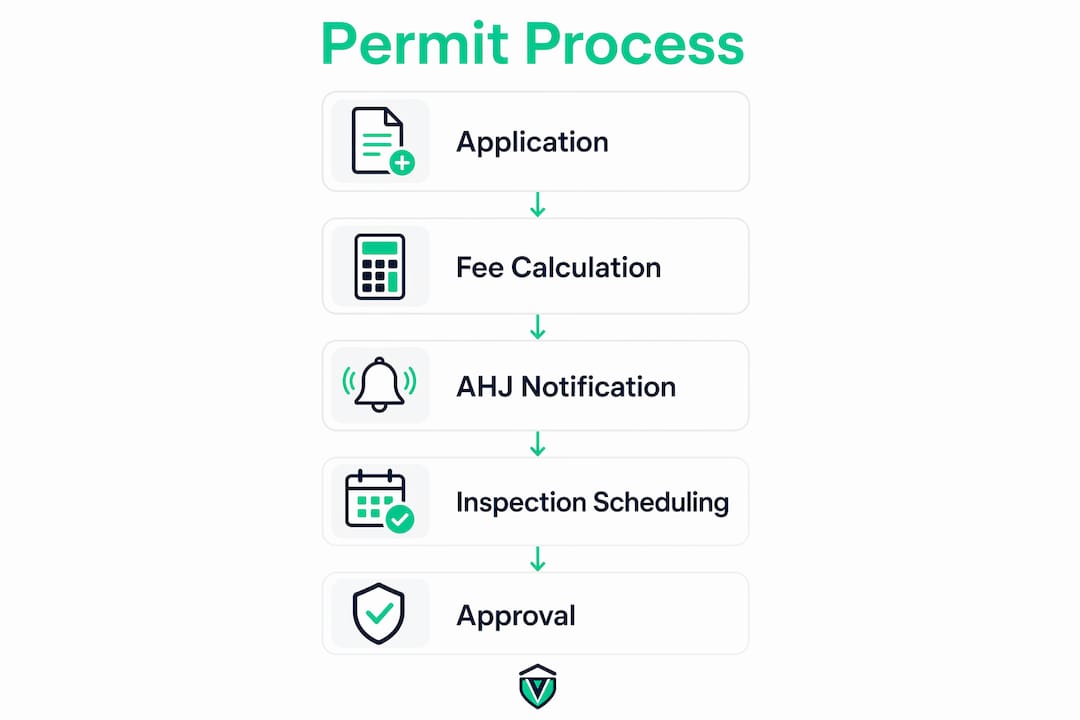
For technical documentation that AHJs commonly request during plan review, fire alarm system design guidance clarifies what drawings and specifications to attach to permit applications.
How do you migrate from spreadsheets to a centralized system?
Use a three-phase rollout: Discover and clean → Pilot (10–20 sites) → Scale and standardize.
Phase 1: Days 0–30 — Inventory and cleanup
- Export all permit records from spreadsheets and shared drives
- Standardize fields: address format, permit type taxonomy, expiration dates
- Identify gaps: missing AHJ contacts, untagged assets, unknown renewal cadences
- Assign corporate compliance owner and regional leads
Phase 2: Days 30–90 — Pilot and integrations
- Import pilot sites (start with 10–20 locations representing your most complex AHJ mix)
- Map assets to permits and set ITM schedules
- Connect SSO and at least one core integration (CMMS or calendar)
- Run first automated reminder cycle and validate outputs
Phase 3: Days 90–180 — Scale and automate
- Roll out remaining locations in batches
- Enable full workflow automation and reporting
- Train regional and site-level staff
- Measure pilot success metrics and adjust
Pilot success metrics to track:
- Percentage of permits with complete data (target: 95%+)
- Number of automated reminders sent and acted on
- Reduction in manual data entry hours per week
- Zero missed renewals during the pilot window
The new location permit checklist provides a ready-made template for site setup, asset tagging, and AHJ assignment that cuts pilot friction significantly.
What does permit automation actually cost, and how do you build the ROI case?
Budget drivers for multi-location fire compliance software are: number of locations, user seats, automated workflow depth, integrations required, and onboarding services. Pricing is not publicly listed for most enterprise tiers, so request itemized quotes.
Cost categories to validate with vendors:
- One-time: data migration, custom integrations, asset tagging labor
- Recurring: platform subscription (per location or per seat), support tier
- Hidden: data cleanup time, staff training hours, custom AHJ template builds
A simple ROI frame: if a compliance manager spends significant time per week on manual permit tracking at a typical hourly rate, the annual labor cost is substantial. Add even one avoided fine (AHJ fines for operating without a valid permit commonly run into hundreds to thousands of dollars per violation) and the math favors automation quickly.
Pro Tip: Ask vendors for a data-export guarantee in the contract. If you ever leave the platform, you need your permit history, asset records, and audit trails in a portable format. Vendors who resist this clause are a red flag.
How do you run daily operations, governance, and audit readiness?
Assign a centralized compliance owner at the corporate level and distributed site stewards at each location. The corporate owner sets policy and monitors KPIs; site stewards handle day-to-day data entry and field coordination.
KPIs to track and target thresholds:
| KPI | Target |
|---|---|
| Average renewal lead time | 60+ days before expiration |
| Overdue permits per site | 0 |
| Mean time to close deficiency | Under 14 days |
| Role | Responsibilities |
|---|---|
| Corporate compliance owner | Policy, KPI review, vendor management, audit prep |
| Regional manager | Site steward oversight, escalation handling |
| Site steward | Data entry, document uploads, local AHJ liaison |
| IT/integrations lead | SSO, API connections, data security |
Audit-ready exports should include timestamped inspection photos, permit history, deficiency logs, and closure records. Mobile capture with device-level placement documentation creates defensible evidence that holds up under AHJ review.
What are the most common mistakes in permit centralization projects?
The most common pitfall is treating permits as static documents rather than lifecycle events. A permit that sits in a folder with no expiration alert, no linked asset, and no assigned owner is a liability waiting to surface.
Pitfalls and fixes:
- Double data entry: Fix by connecting the permit system to your CMMS or ERP via API on day one of the pilot
- No AHJ mapping: Fix by requiring AHJ contact and portal URL as mandatory fields before any site goes live
- Weak asset IDs: Fix by using a consistent naming convention (location code + asset type + sequence number) before import
- No owner assignments: Fix by making owner assignment a required field at the permit level, not just the site level
- Poor training: Fix by running a 30-minute role-specific walkthrough for site stewards before go-live, not after
Pro Tip: Set a realistic remediation SLA for deficiencies: 14 days for low-risk items, 48 hours for critical life-safety findings. Build those SLAs into the system's workflow triggers so overdue deficiencies escalate automatically.
How does Vaultedai's onboarding work for multi-location operators?
Vaultedai delivers a working pilot in weeks, not months. The typical onboarding sequence runs:
- Inventory import: upload existing permit records via spreadsheet; AI extracts and maps fields
- AHJ mapping: assign jurisdiction, contact, and portal URL to each site
- Pilot site tagging: tag assets at 10–20 pilot locations and link to permits
- Mobile rollout: field teams download the mobile app and complete first inspection cycle
- Automation enablement: turn on renewal reminders, deficiency workflows, and reporting dashboards
Vaultedai is built for operators who run franchises, restaurant groups, convenience stores, and similar multi-location businesses. The platform centralizes permits, automates renewals, and gives corporate teams real-time visibility across every site from a single dashboard — without requiring a six-month implementation.
Measurable benefits operators report after onboarding:
- Reduction in overdue permits across the portfolio
- All compliance documents centralized and searchable
- Audit-ready evidence available on demand
- Fewer manual hours spent chasing renewal deadlines
Vaultedai's AI-enabled permit tracking and fast onboarding make it a practical fit for growing operators who need compliance visibility without building a dedicated compliance team from scratch.
What should you check before signing a vendor contract?
Validate five things before committing: lifecycle support, AHJ templates, integrations, audit trails, and onboarding speed.
QA checklist:
- Does the platform track the full permit lifecycle from application to renewal?
- Does it include jurisdiction-specific AHJ checklists for your locations?
- Does it offer an open API and pre-built integrations with your CMMS or ERP?
- Does it produce timestamped, exportable audit trails?
- Can you go live with a pilot in under 30 days?
Red flags:
- No open API or integration documentation
- No mobile capture capability for field teams
- Opaque pricing with no per-location or per-seat breakdown
- No data export guarantee in the contract
- Onboarding measured in months, not weeks
Contract clauses to request:
- Data ownership: you own all permit records and audit trails
- Uptime SLA: minimum 99.5% availability
- Exit data export: full data export in a portable format within 30 days of cancellation
Key Takeaways
A centralized, automated fire inspection permit organization system is the only reliable way for multi-location businesses to maintain continuous compliance, eliminate missed renewals, and produce audit-ready documentation on demand.
| Point | Details |
|---|---|
| Model the data hierarchy correctly | Link site → building → unit/tenant → asset → permit → AHJ before importing any records. |
| Use a three-phase rollout | Run a 10–20 site pilot in days 30–90 before scaling to the full portfolio. |
| Track four core KPIs | Monitor permit compliance rate, renewal lead time, overdue count, and deficiency close time. |
| Automate in three layers | Set up ingest, link, and action workflows to eliminate double entry and missed deadlines. |
| Vaultedai for multi-location teams | Vaultedai centralizes permits, automates renewals, and delivers AI extraction with fast onboarding for franchises, restaurants, and convenience stores. |
The visibility problem nobody talks about enough
The conventional wisdom on fire compliance focuses on documentation: get the right forms, file on time, keep copies. That framing misses the actual operational problem, which is visibility. You can have every permit filed correctly and still have no idea which of your 40 locations is 11 days from expiration right now.
What changes when you centralize isn't the paperwork. It's the moment you stop reacting to AHJ notices and start catching problems before they become violations. That shift from reactive to proactive compliance is the real value of a purpose-built system, and it happens almost immediately once the data is structured correctly.
The operators who get the most out of these platforms are the ones who treat the migration as a data quality project first. Clean data in means clean alerts out. Garbage in means you're still chasing the same problems, just in a different interface.
One thing worth saying plainly: the 90-day rollout timeline is achievable, but only if someone owns it. The technology is the easy part. The hard part is getting regional managers to treat the pilot as a priority instead of an IT project happening to them.
Vaultedai gives multi-location operators compliance visibility from day one
Missed fire inspection deadlines don't announce themselves. They surface during an AHJ visit, a lease renewal audit, or a franchise compliance review, and by then the cost is real. Vaultedai was built specifically for the operators who can't afford that surprise: franchise groups, restaurant chains, convenience store networks, and any multi-location business where permits span dozens of jurisdictions with different renewal cadences and AHJ requirements.
The platform centralizes every permit, automates renewal reminders, and uses AI extraction to pull key fields from uploaded documents without manual re-entry. AHJ mapping, jurisdiction-specific checklists, and mobile capture are built in from the start. Onboarding is measured in weeks, not quarters.
If your team is still managing fire permits across locations with spreadsheets or shared drives, the gap between where you are and where you need to be is smaller than you think. Start a pilot with Vaultedai and have your first 10–20 locations live and automated within 30 days.
Useful sources and further reading
Vaultedai internal guides (operational checklists and migration templates):
- Fire Safety Permit Guide for Multi-Location Businesses — permit types, common challenges, and operational checklists
- New Location Permit Checklist for Multi-Location Operators — step-by-step site setup and asset tagging template
- How to Manage State and Local Permits Simultaneously — reconciling overlapping AHJ and state fire marshal requirements
- How to Establish a Permit Management Standard Process — governance, roles, and KPI framework
Technical design references (partner resources):
- Fire Alarm System Design Services | Futuregen — technical documentation AHJs require for plan review
- Fire Alarm Device Placement Guide | Futuregen — device-level diagrams and as-built documentation for inspections
US regulatory reference:
- GOVmotus Fire | CAL FIRE OSFM — California's electronic permitting and licensing system, a model for understanding how state-level AHJ portals are evolving nationally