
Centralize your permit registry and enable automated, jurisdiction-aware renewal workflows. That single structural change stops the majority of missed renewals at multi-location businesses. Here is how to act on it right now:
- Register your top three at-risk permit sets (health department, business licenses, and any state-specific tobacco or food-handler certificates) in a single centralized system.
- Assign a named owner to each permit category, not just each location, so accountability doesn't disappear during staff turnover.
- Enable automated reminders and bulk imports so expiration dates trigger notifications 90, 60, and 30 days out without anyone manually checking a spreadsheet.
If you are managing five or more locations and still relying on spreadsheets, run a one-to-three site pilot on a dedicated platform before your next renewal cycle. The operational gap between a spreadsheet and a governed platform becomes obvious within the first 30 days.
Key Takeaways
Centralized permit registries with automated, jurisdiction-aware renewal workflows are the single most effective structural change a multi-location operator can make to stop missed renewals and reduce compliance risk.
| Point | Details |
|---|---|
| Centralize before you automate | Build a single permit registry across all locations before configuring reminders, or automation routes alerts to the wrong owners. |
| Assign category-based ownership | One person owns all health permits across every site; this model survives staff turnover far better than location-based ownership. |
| Use a 30/60/90 pilot rollout | Start with one to three high-complexity sites, validate KPIs by day 60, then migrate remaining locations in batches of 10–20. |
| Track three core KPIs | Measure time-to-renew after first notification, overdue rate by category, and percentage of renewals completed without manual escalation. |
| Vaultedai for multi-location teams | Vaultedai provides centralized tracking, automated reminders, jurisdiction checklists, and bulk imports designed for operators scaling beyond spreadsheets. |
Table of Contents
- What does permit renewal tracking mean for multi-location operations?
- Which types of permits do multi-location businesses need to track?
- Why do organizations keep missing renewals?
- What software features do you need to manage permit renewals at scale?
- How do you build a governance model that makes scaling reliable?
- What does a realistic rollout from spreadsheets to a platform look like?
- What drives cost, and how do you estimate ROI?
- How do you evaluate permit management vendors without getting burned?
- Why Vaultedai is built for multi-location permit renewal at scale
- How should you protect permit data at scale?
- How do you plan for emergency renewals and unexpected permit changes?
- The part of permit scaling most teams get wrong
- See how Vaultedai handles your permit portfolio
- Sources
What does permit renewal tracking mean for multi-location operations?
Permit renewal tracking is the practice of maintaining a centralized, lifecycle-aware record of every permit, license, certificate, and recurring regulatory filing across all business locations, with automated alerts and jurisdiction-specific workflows tied to each item's expiration date.
For a single-location business, a shared folder and a calendar reminder can work. For a 20-location restaurant group or a regional convenience store chain, that approach collapses. The scope of what a multi-location platform must cover includes:
- Active permits and licenses at every site (business, health, food service, signage, liquor, tobacco)
- Recurring regulatory filings with fixed deadlines (IFTA quarterly filings, annual contractor license renewals)
- Compliance certificates tied to equipment or personnel (food handler cards, HVAC contractor certificates)
- Document storage with version control so the current approved permit is always retrievable during an inspection
The audit-impact dimension is where centralized tracking pays off most visibly. When a health inspector or a state licensing board requests documentation, a team running a centralized registry can pull every current permit for every location in minutes. A team running location-level spreadsheets typically spends hours assembling the same package, and often discovers expired items in the process. Organizing business licenses in one place before an audit cycle is the difference between a clean review and a corrective action plan.
Which types of permits do multi-location businesses need to track?
The permit universe for a multi-location U.S. operator is wider than most compliance teams initially map. Grouping by jurisdiction level makes the inventory manageable.
Federal and state-level permits
- Federal Employer Identification Number (EIN) registration and related tax registrations
- State business licenses and foreign entity registrations (required in every state where you operate)
- State-level tobacco, alcohol, and cannabis retail permits
- Contractor licenses issued by state licensing boards
- IFTA (International Fuel Tax Agreement) and IRP (International Registration Plan) credentials for fleet operators
- Oversize/overweight vehicle permits for trucking operations
County and municipal permits
- Local business operating licenses (often renewed annually, sometimes biannually)
- Health department permits for food service, food handling, and retail food sales
- Signage and outdoor advertising permits
- Certificate of Occupancy and fire safety inspections
- Zoning and land-use permits tied to specific addresses
Industry-specific examples
Restaurants and food service: health department operating permits, food handler certifications for staff, grease trap inspection certificates, liquor licenses, and temporary event permits for catering or pop-ups. A full breakdown of health department permit categories is worth reviewing before building your inventory.
Retail (smoke shops, convenience stores, vape retailers): state tobacco retailer permits, local tobacco/vape sales licenses, age-verification compliance certifications, and lottery retailer licenses where applicable.
Trucking and fleet operators: IFTA quarterly filings, IRP cab card renewals, oversize/overweight corridor permits, and state-specific fuel tax registrations.
Construction and contractors: state contractor licenses, specialty trade licenses (electrical, plumbing, HVAC), building permits tied to specific project addresses, and insurance certificates filed with municipal agencies.
Hidden permits most teams miss: temporary use permits for seasonal operations, event permits for on-site promotions, HVAC contractor certificates required by some municipalities before equipment installation, and annual fire extinguisher inspection tags that carry a compliance filing.
Why do organizations keep missing renewals?
Missing a renewal is rarely a one-time oversight. It is almost always a systems failure. The root causes cluster around a few recurring patterns.
Decentralized records. When each location manager keeps their own folder, there is no single source of truth. A permit renewed at Location 7 may never be reflected in the corporate compliance record. Nobody knows what expired until someone checks, and checking requires visiting every location's files.

Spreadsheet dependency. A spreadsheet can track expiration dates, but it cannot send a reminder, verify a jurisdiction requirement, or flag a renewal that requires a government portal login versus a simple form submission. The moment a spreadsheet owner leaves the company, the institutional knowledge leaves with them.
No single owner. "Everyone is responsible" means no one is. When a tobacco permit renewal falls between the store manager and the regional compliance lead, it often falls through entirely.
Inconsistent SOPs. A franchise with 40 locations often has 40 slightly different renewal processes. Some managers renew 60 days early; others wait for a paper notice in the mail. Without a standard renewal window and escalation path, the process depends entirely on individual habits.
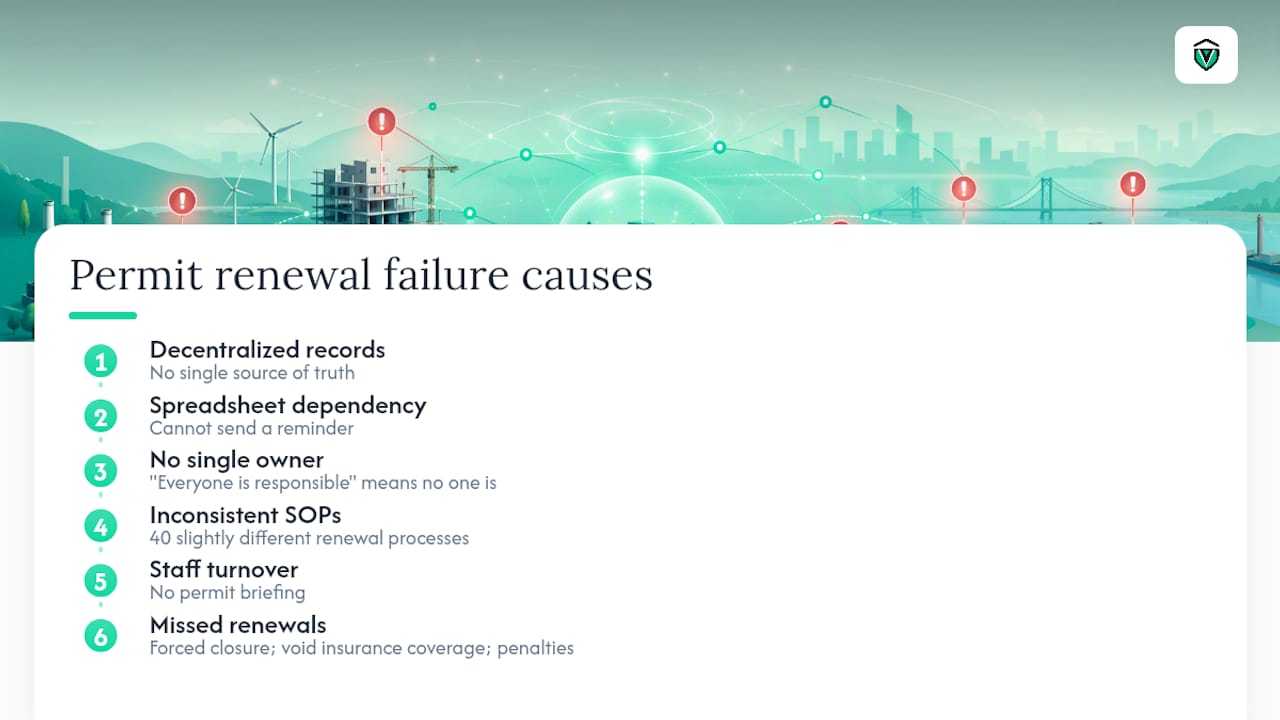
Staff turnover. A new store manager inherits a location with no permit briefing. The previous manager knew which permits needed renewal in March. The new one does not, and no system tells them.
Impact when things go wrong: a missed health department permit renewal can trigger a forced closure during inspection. A lapsed contractor license can void insurance coverage on an active job. A missed IFTA filing generates penalties and interest from multiple state tax authorities simultaneously. The cost of a single missed renewal, counting fines, reapplication fees, and operational disruption, typically exceeds a full year of platform subscription costs.
What software features do you need to manage permit renewals at scale?
The feature list below is prioritized by operational impact for multi-location teams. Use it as a procurement checklist.
Core features and what they actually do for you
- Centralized permit registry: one database for every permit, license, and certificate across all locations. Eliminates the "which spreadsheet has the current version?" problem entirely.
- Jurisdiction database: pre-loaded renewal requirements, fee schedules, and agency contact information by state, county, and municipality. Reduces the research time your team spends verifying requirements before each renewal cycle.
- Automated reminders: configurable alerts at 90/60/30-day intervals tied to each permit's expiration date. Reminders route to the assigned owner, not just a generic inbox.
- Bulk import and bulk renewal: the ability to import permit records via CSV and to apply renewal actions across a filtered set of permits simultaneously. Trimble Unity's documentation shows that CSV bulk import and export, covering case data, workflows, fees, and roles, is a standard capability in governed permitting systems. Similarly, NHVR's portal documentation describes filtering permits by end date or workflow state and applying bulk renew or cancel actions in a single step, which is exactly the workflow a 50-location operator needs.
- Workflow automation: rule-based triggers that move a permit through intake, approval, document upload, and submission steps without manual handoffs.
- Audit log: a timestamped record of every action taken on every permit. Non-negotiable for regulatory audits and internal accountability.
- Role-based access: site managers see their location's permits; regional leads see their territory; corporate compliance sees everything. Prevents accidental edits and limits data exposure.
- Integrations: connections to HR systems (for staff certification tracking), POS systems (for license-linked sales compliance), and SSO providers (for enterprise identity management).
- Mobile access: field managers and site operators need to pull up a permit document during an inspection without calling the corporate office.
- Secure document storage: encrypted, access-controlled storage for permit PDFs with version history.
Enterprise-specific notes on export and API behavior
Large multi-jurisdiction rollouts often hit limits that smaller deployments never encounter. When pulling permit data across hundreds of locations and multiple states, export calls can return row caps and require asynchronous delivery rather than instant downloads. Plan your data architecture and reporting cadence around these constraints before signing an enterprise contract. Per-jurisdiction pricing and bulk export thresholds can meaningfully change total cost at scale.
How do you build a governance model that makes scaling reliable?
Software alone does not stop missed renewals. The governance layer, who owns what and what happens when a deadline approaches, is what makes the system work at 50 locations the same way it works at five.
Centralized vs. hybrid governance
A fully centralized model, where a corporate compliance team owns every renewal, works well up to roughly a dozen locations. Beyond that, the volume of jurisdiction-specific details and the need for local knowledge usually pushes teams toward a hybrid model: corporate compliance sets standards, owns the system, and handles state-level permits; regional or site leads own local permits and execute renewals within the corporate SOP.
Pro Tip: Assign permit ownership by category, not by location. One person owns all health department permits across every site. Another owns all business licenses. This structure survives staff turnover at individual locations far better than location-based ownership.
SOP checklist for permit renewal governance
- Intake standard: every new permit or license is entered into the central registry within 48 hours of issuance, with the expiration date, issuing agency, and renewal method documented.
- Approval authority: define who can approve a renewal submission (site manager for local permits under a dollar threshold; regional lead or compliance manager for state-level or high-value licenses).
- Document storage standard: original permit PDFs stored in the central system; physical copies posted at the location per agency requirements.
- Renewal window definition: all renewals initiated no later than 60 days before expiration; escalation to the compliance manager if not initiated by 45 days.
- Escalation path: overdue items escalate from site owner to regional lead at 30 days, to compliance director at 15 days, and to legal/operations at expiration.
KPIs to track
- Time-to-renew after first notification: how many days from the 90-day alert to completed submission
- Percentage of renewals completed before expiration: target 100%; anything below 95% signals a process gap
- Overdue rate by location and by permit category: identifies which sites or permit types need additional support
- Percentage of renewals completed without manual escalation: a proxy for automation effectiveness
For a detailed SOP framework, establishing a permit management standard process covers the intake-to-archive workflow in full.
What does a realistic rollout from spreadsheets to a platform look like?
A 30/60/90 rollout is the lowest-risk path from spreadsheets to a governed platform. Here is how to structure it.
30/60/90 implementation timeline
Days 1–30: Pilot setup
- Select one to three pilot sites that represent your highest permit complexity (most permit types, most jurisdictions, or most recent audit activity).
- Complete a data-migration audit: list every active permit, its expiration date, issuing agency, renewal method, and current owner.
- Import pilot-site permit records using CSV bulk import. Trimble Unity's procedural documentation confirms that templated CSV imports covering case data, workflows, and roles are the fastest path from legacy spreadsheets to a governed system.
- Configure automated reminders at 90/60/30 days for each permit.
- Assign owners and confirm they have received and acknowledged their first reminder.
Days 31–60: Pilot validation
- Track pilot KPIs: overdue rate, time-to-renew after first notification, user login frequency.
- Run one full renewal cycle end-to-end on the platform for at least two permit types.
- Identify any jurisdiction gaps (permits the system does not yet have pre-loaded data for) and document workarounds.
- Gather feedback from site managers on the mobile access experience and reminder clarity.
Days 61–90: Enterprise expansion
- Migrate remaining locations in batches of 10–20, using the pilot's CSV template as the standard import format.
- Conduct a 60-minute training session per regional cohort (not per location, which does not scale).
- Set enterprise-wide KPI baselines using the pilot data as the benchmark.
- Schedule a 90-day post-launch audit to verify overdue rate and automation percentage.
Data-migration checklist
- Permit name, type, and category
- Issuing agency name and contact
- Issue date and expiration date
- Renewal method (online portal, mail, in-person)
- Assigned owner (name and role)
- Current status (active, pending renewal, expired)
- Document file (PDF of current permit)
- Jurisdiction (state, county, municipality)
Handling duplicates: before import, sort the spreadsheet by permit name and location. Flag any permit that appears more than once and confirm which record is current before importing. Duplicate records in a centralized system create conflicting reminder schedules.
Pilot success criteria
- Zero permits expired during the pilot period
- 90% or more of renewal actions initiated before the 45-day escalation threshold
- All pilot-site users logged in at least once within the first 14 days
- Time-to-renew reduced compared to the pre-platform baseline
What drives cost, and how do you estimate ROI?
Permit management platform costs vary by several factors. Understanding them before you sign a contract prevents budget surprises at renewal time.
Primary cost drivers:
- User seats: most platforms price per user or per location; enterprise tiers often bundle locations.
- Jurisdictions monitored: platforms with pre-loaded jurisdiction databases may charge per jurisdiction or tier pricing by geographic scope.
- API and export volume: large multi-jurisdiction exports may trigger enterprise pricing or per-call fees. Plan export cadence carefully to avoid throttling.
- Onboarding and professional services: data migration support, custom integrations, and dedicated onboarding are often quoted separately.
- Integrations: HR, POS, and SSO connections may carry additional licensing fees.
Illustrative ROI example
The numbers below are illustrative placeholders. Replace them with your actual figures to build a business case.
The avoided-fine and avoided-closure rows are where the ROI case becomes compelling quickly. A single health department closure during a busy weekend can cost more than a full year of platform fees. Bulk permit processing programs at organizations like university transit services demonstrate that real-time processing and reduced data entry translate directly into measurable administrative time savings, even at smaller operational scales.
How do you evaluate permit management vendors without getting burned?
The vendor evaluation process for a multi-location compliance platform deserves more rigor than most procurement teams apply. Here is what to ask and what to watch for.
Questions to ask in every demo or RFP
- How many U.S. jurisdictions does your database cover, and how often is it updated?
- What is the maximum number of permits we can bulk-import in a single CSV upload?
- Can we filter permits by expiration date and apply bulk renewal actions in one step?
- What integrations do you support natively, and which require custom API work?
- What is your average onboarding time for a 20-location rollout?
- Who owns our data if we cancel, and what is the export format and timeline?
- What is your SLA for support response, and is it tiered by severity?
- Do you have audit log exports, and in what format?
Red flags to watch for
- No bulk export capability. If you cannot export your full permit registry in a standard format, you are locked in with no exit path.
- No audit log. Any platform without a timestamped action log is not suitable for regulated industries.
- Jurisdiction coverage gaps. A platform that covers 30 states confidently but has thin data for the other 20 is a problem for a national operator.
- Unclear data ownership. If the contract does not explicitly state that you own your permit data, negotiate that clause before signing.
- Slow onboarding timelines. A vendor quoting 6–12 months to go live for a 20-location rollout is a red flag. Modern platforms should reach operational status within 30–60 days for a pilot.
- No mobile access. Site managers need permit documents available during inspections. A desktop-only platform creates a gap at the moment it matters most.
Suggested procurement scoring weights for multi-location use cases
A platform that scores well on features but poorly on onboarding speed will cost you more in implementation labor than you saved on licensing.
For a broader view of the platform options available to multi-location operators, alternatives for compliance management covers the feature trade-offs worth understanding before you finalize a shortlist.
Why Vaultedai is built for multi-location permit renewal at scale
Vaultedai maps directly to the feature checklist above. The platform provides a centralized permit registry, automated renewal reminders, jurisdiction-specific compliance checklists, bulk import capabilities, and secure cloud and mobile document access, all designed for operators who have outgrown spreadsheets and need a governed system that works across dozens or hundreds of locations.
How Vaultedai fits the feature checklist
- Central registry: every permit, license, and certificate across all locations in one place, with status visible at a glance.
- Automated reminders: configurable alerts routed to named owners, not generic inboxes.
- Jurisdiction-specific checklists: pre-loaded compliance requirements by state and locality, so your team is not researching renewal rules from scratch each cycle.
- Bulk imports: CSV-based import for fast data migration from existing spreadsheets.
- AI-powered document extraction: the platform reads permit documents and extracts key fields (expiration date, issuing agency, permit number) automatically, reducing manual data entry during onboarding.
- Mobile access: site managers can pull up current permits during an inspection from any device.
What a pilot looks like
A one-to-three site pilot on Vaultedai typically reaches operational status within the first two weeks. By day 30, pilot sites have a complete permit registry, automated reminders running, and at least one bulk renewal cycle completed. The operational outcomes to expect from a successful pilot include zero expired permits during the pilot window, a measurable reduction in time spent on manual tracking, and a clear picture of which permit categories carry the most renewal risk across your portfolio.
For operators managing state and local permits simultaneously across multiple jurisdictions, managing state and local permits simultaneously provides additional operational context that complements the platform's jurisdiction database.
How should you protect permit data at scale?
Permit records contain sensitive business information: legal entity names, tax identification numbers, physical addresses, regulatory history, and in some cases personnel certifications tied to individual employees. At scale, the data security requirements for a permit management system are not trivial.
Encryption in transit and at rest is the baseline. Any platform handling permit documents should use TLS 1.2 or higher for data in transit and AES-256 encryption for stored documents. Confirm this in the vendor's security documentation before signing.
Access controls matter as much as encryption. Role-based access ensures that a site manager in Phoenix cannot view or edit permit records for locations in Atlanta. At enterprise scale, SSO integration with your identity provider (Okta, Microsoft Entra, or similar) centralizes access management and ensures that offboarded employees lose access immediately.
Audit trails serve a dual purpose: they satisfy regulatory requirements in industries where permit compliance is audited, and they provide an internal accountability record when a renewal is missed or a document is altered. A complete audit log should capture who accessed a record, what action was taken, and when.
Data residency and retention policies are increasingly relevant for multi-state operators. Confirm that the platform stores data in U.S.-based data centers and that your contract specifies a data retention period and a deletion process at contract end.
Vendor SOC 2 Type II certification is the standard benchmark for SaaS platforms handling sensitive business data. Request the vendor's most recent SOC 2 report during procurement. A vendor that cannot produce one is not ready for enterprise compliance use cases.
How do you plan for emergency renewals and unexpected permit changes?
Even a well-governed system encounters surprises. A municipality changes its renewal process mid-cycle. A state agency moves its portal to a new URL. A permit is revoked following an inspection and must be reapplied for under a new application number. These situations require a contingency layer on top of your standard SOP.

Maintain an emergency renewal contact list. For every permit category, document the direct phone number and email for the issuing agency's renewal desk, not just the general agency website. When a portal goes down or a deadline is moved, you need a human contact, not a web form.
Define an emergency renewal SLA. Standard renewals follow the 60-day window. Emergency renewals, triggered by a revocation, a sudden regulatory change, or a missed deadline discovered late, should have a 24-hour escalation path to the compliance director and a 48-hour target for reapplication submission.
Monitor regulatory change feeds. Several state licensing boards and municipal agencies publish regulatory update newsletters or RSS feeds. Assign someone to monitor these for your highest-risk permit categories. A 30-day advance notice of a process change is far easier to manage than discovering it on the renewal deadline.
Build a buffer into your renewal calendar. Targeting completion 60 days before expiration, rather than 30, gives you a full month to absorb an unexpected complication, a portal outage, a missing document, or an agency processing delay, without triggering an expiration.
Document every exception. When an emergency renewal occurs, log the root cause, the resolution steps, and the time spent. Over 12 months, this log will show you which permit categories and jurisdictions carry the most operational risk, and where to invest additional automation or monitoring.
The part of permit scaling most teams get wrong
Most compliance teams approach permit renewal at scale as a software problem. Buy the right platform, configure the reminders, and the problem is solved. That framing is wrong, and it is why so many platform rollouts stall after the pilot.
The real problem is ownership clarity. Software can send a reminder to an inbox. It cannot make a store manager care about a tobacco permit renewal when they are also managing a short-staffed Friday night shift. The teams that successfully scale permit management are the ones that treat it as a governance problem first and a technology problem second.
The governance insight that most articles miss: the most effective ownership model assigns permits by category across all locations, not by location. One person owns every health department permit in the portfolio. Another owns every business license. This structure means that when a state changes its renewal process for food service permits, one person knows about it and updates every affected record. In a location-based model, that same change requires 40 individual managers to each discover and adapt to it independently.
The second thing teams underestimate is the change management cost of moving from spreadsheets. Site managers who have been managing their own permit folders for years often resist centralization because it feels like losing control. The fix is not a mandate. It is showing them, concretely, that the new system sends them a reminder before the deadline instead of after, and that they no longer have to remember the renewal date themselves. That framing converts skeptics faster than any executive directive.
See how Vaultedai handles your permit portfolio
Multi-location operators who have spent years patching spreadsheets together know the real cost: not just the occasional fine, but the hours spent every quarter manually checking expiration dates, chasing down documents, and rebuilding institutional knowledge after staff turnover.
Vaultedai gives you a centralized permit registry, automated renewal reminders, jurisdiction-specific checklists, and bulk import tools built specifically for operators managing compliance across multiple sites. A pilot covers one to three locations, takes roughly two weeks to reach operational status, and gives you a clear before-and-after picture of your renewal risk exposure.
The demo walks through your specific permit categories, shows how bulk import works with your existing spreadsheet data, and maps your jurisdiction footprint to the platform's compliance checklists. No lengthy implementation project. No consultant required.
Start your pilot at Vaultedai and see what your renewal risk looks like with a governed system behind it.
Sources
The sources below cover jurisdiction-specific rules, bulk import procedures, and platform documentation relevant to scaling permit renewals across U.S. locations.
- PerformBulkExportOrBulkImport.htm — Trimble Unity Help
- Employee Bulk Day Permit Request Form | University Transit Services
- Bulk actions across a number of permits - NHVR Portal Help Centre - Help Centre