
The fastest way to collect vendor compliance documents across multiple locations is to stop chasing them site by site and centralize the process in one platform with jurisdiction-specific checklists and automated renewal alerts. That single change fixes the two things that break most multi-location operators: nobody knows which permits are due where, and nobody owns fixing it before it lapses.
This approach fits franchise groups, restaurant operators, and convenience store chains running five locations or fifty. Managing licenses at that scale requires a centralized single source of truth instead of a patchwork of spreadsheets and inboxes. A platform like Vaulted builds that structure around your locations from day one.
Your next move is simple:
- Build a master checklist per jurisdiction before you request a single document.
- Assign one person per location to collect, and one regional owner to verify.
- Run a five-location pilot to test the workflow before scaling it company-wide.
Key Takeaways
Centralizing vendor compliance document collection into one jurisdiction-aware platform with automated renewal reminders prevents missed deadlines and closes ownership gaps at scale.
| Point | Details |
|---|---|
| Treat every location separately | Jurisdiction rules vary by city and county, so build a distinct checklist for each address. |
| Capture full metadata | Store location ID, permit type, issuing authority, and expiration date with every document. |
| Assign clear roles | Use a site manager to collect, a regional owner to verify, and a corporate verifier for final QA. |
| Pilot before scaling | Test the workflow on three to five locations, including your hardest ones, before rolling out further. |
| Automate renewal tracking | Vaulted centralizes documents and jurisdiction checklists with automated reminders to prevent lapses. |
Table of Contents
- What Documents Do You Need to Collect for Each Location?
- How Should You Structure the Document Collection Workflow?
- Which Platform Features Actually Matter for Automating Renewals?
- How Do You Onboard a Compliance Platform Without Disrupting Operations?
- What Mistakes Cause Compliance Programs to Fail?
- Why Centralizing Compliance Documents Changes How Teams Operate
- How Vaulted Centralizes Vendor Compliance Document Collection
- Sources
What Documents Do You Need to Collect for Each Location?
Every location needs its own paper trail, because a permit valid in one city can mean nothing three miles away in the next township. Requirements shift at the county, city, and even fire-district level, so treat each address as its own compliance case rather than a copy of the last one.
Start with the documents nearly every location needs, then layer on industry-specific ones:
- Business operating license — the baseline permit to legally run at that address.
- Certificate of occupancy (CO) — proof the building is approved for your specific use.
- Health department permit — required for anywhere handling food or beverages.
- Fire department inspection certificate — covers extinguishers, exits, and alarm systems.
- Sales tax permit or seller's license — tied to the state or local taxing authority.
- Signage permit — often overlooked, frequently enforced.
- Alcohol or tobacco license where applicable — among the slowest to renew and the costliest to miss.
- Building or zoning compliance certificate — confirms the space matches its zoned use.
For each one, store the actual scanned certificate, the payment receipt, the inspector's name, the issuance date, and the expiration date. Keeping that receipt and reference number on file matters more than most operators realize. It's the first thing an auditor or renewal clerk asks for when a submission gets questioned.
Tag every file with metadata: location ID, permit type, jurisdiction, issuing authority, and expiration date. This is what turns a folder of PDFs into a searchable compliance system.

Pro Tip: Name every file the same way, every time: LocationID_PermitType_ExpirationDate.pdf. It sounds tedious until you're searching for one expired fire certificate out of 400 files at 4:45 p.m. on a Friday.
How Should You Structure the Document Collection Workflow?
Collecting compliance paperwork breaks down the moment too many people touch it with no clear handoff. The fix is a workflow with defined roles and a fixed sequence, repeated identically at every location.
Three roles make this work:
- Site manager collects the document at the location, photographs or scans it, and uploads it immediately rather than filing it in a drawer.
- Regional compliance owner validates the submission against the jurisdiction's checklist, checking that it's the right permit type for that specific city or county.
- Corporate verifier performs final quality assurance, confirming signatures, expiration dates, and file naming before the document is marked complete.
The submission channel matters as much as the roles. Mobile upload beats email attachments because it timestamps the moment of capture and forces the required metadata fields (location ID, permit type, expiration date) before the file saves. A centralized portal with real-time tracking also cuts the time your regional managers spend emailing locations asking, "Did you ever get that?"
Before marking any document complete, run it against this third party vendor management checklist for property managers:
- Does the permit type match what that jurisdiction actually requires?
- Is the issuing authority correct for that specific address?
- Are all required signatures present?
- Is the expiration date captured and entered into the renewal calendar?
When a document is missing or non-compliant, escalate within 48 hours: notify the site manager, set a hard deadline, and flag the location as "at risk" in your dashboard until it's resolved.
Which Platform Features Actually Matter for Automating Renewals?
Skip vendor comparisons based on marketing copy and evaluate platforms against a fixed feature list instead. Most tools call themselves "compliance software." Few actually deliver jurisdiction-aware logic.
The features that matter:
- Centralized dashboard showing every location's compliance status at a glance.
- Jurisdiction-aware checklists that adjust automatically based on city, county, and state rules.
- OCR and data extraction that pulls expiration dates and permit numbers straight off scanned documents.
- Automated renewal reminders triggered well before the deadline, not the week of.
- Document version control so nobody overwrites a valid certificate with an outdated draft.
- Role-based access controls limiting who can approve versus who can only upload.
- Integrations with HR, finance, or project management tools your team already runs on.
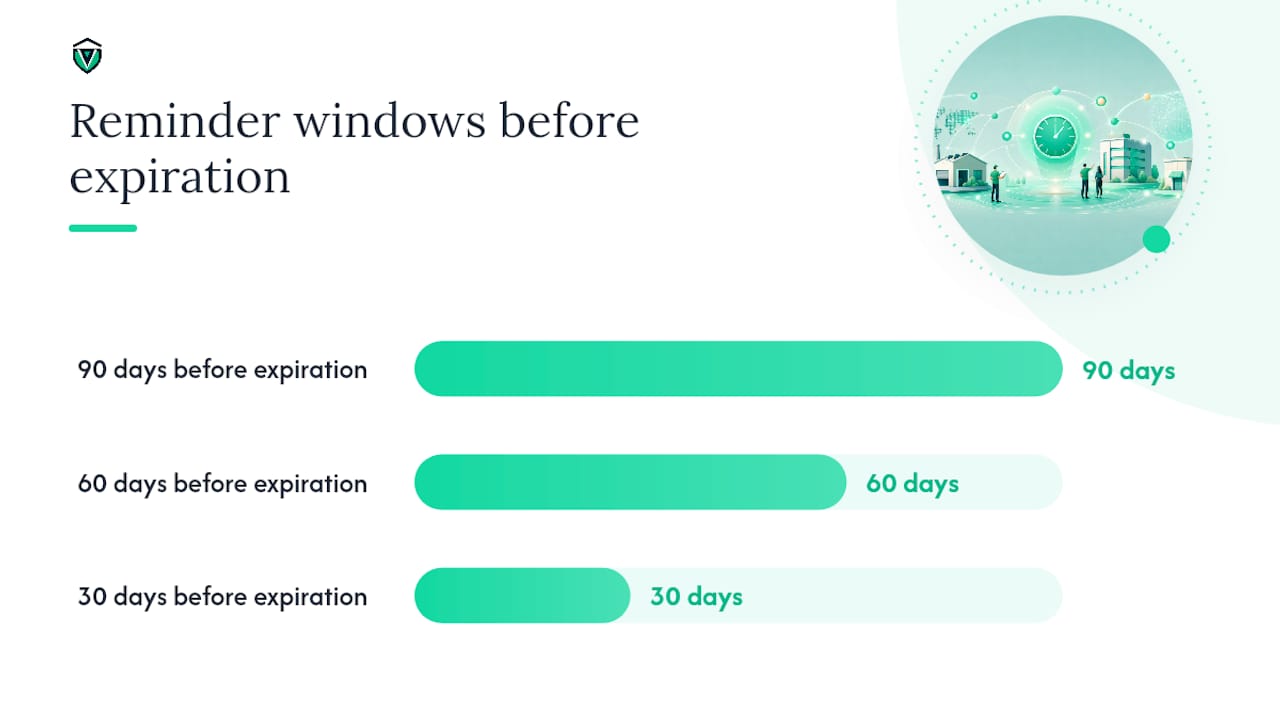
On the operational side, track onboarding time, days-to-ingest per document, percent-complete by location, and upcoming expirations in the next 30/60/90 days. On security, look for encryption at rest, a full audit log, and a defined document retention policy.
Enterprises running dozens of sites tend to need one integrated platform. Smaller chains sometimes patch together field apps and spreadsheets, but that combination breaks down fast past a certain location count, usually right when leadership stops noticing which sites are behind.
How Do You Onboard a Compliance Platform Without Disrupting Operations?
Rolling out a new system across dozens of locations sounds disruptive. It doesn't have to be, if you sequence it correctly.
- Audit your current state. Pull every existing permit, license, and certificate into one repository, even the ones sitting in someone's email folder.
- Map jurisdiction requirements. Build a master checklist for each city or county you operate in, since standardized checklists per jurisdiction are what let this scale past a handful of sites.
- Run a pilot. Start with three to five locations, measure baseline metrics like days-to-ingest and percent-complete, and adjust your SOPs before rolling out further.
- Set governance. Assign a named owner for renewals at every location, schedule quarterly audits, and set reminder windows at 30, 60, and 90 days before expiration.
A pilot at this scale also gives you real evidence of time-to-value, which is exactly what makes a portfolio-wide rollout easier to justify internally before you commit budget to every site.
Pro Tip: Don't pilot your five easiest locations. Pick two that are notoriously slow with paperwork. If the workflow survives them, it'll survive anywhere.
What Mistakes Cause Compliance Programs to Fail?
Most compliance breakdowns aren't complicated. They're the same handful of avoidable errors repeated across every location.
- Spreadsheets and email chains collapse once you pass ten or fifteen locations. There's no single source of truth, and nobody notices a missed renewal until an inspector shows up.
- Assuming requirements are identical across jurisdictions. A permit that's automatic in one county requires a public hearing in the next. Verify and maintain separate checklists for each.
- Skipping version control. Someone re-uploads an expired certificate over the valid one, and now your "complete" file is wrong.
- No assigned renewal owner. Automated reminders help, but they only work if a specific person is responsible for acting on them.
- Underbudgeting for fees and processing time. Application costs and review timelines vary wildly by city, and assuming a two-week turnaround when the real number is six weeks delays your opening.
Why Centralizing Compliance Documents Changes How Teams Operate
The operators who get this right stop treating compliance as paperwork and start treating it as a system with owners, deadlines, and a single record of truth. What surprised me most in researching this: the failure point is rarely a missing document. It's almost always a missing owner, someone who was supposed to check the renewal date and didn't know it was their job. Fix that, and the paperwork mostly takes care of itself. If you're weighing whether a pilot is worth the setup time, run it on your two hardest locations first. If the process holds there, it holds everywhere.
How Vaulted Centralizes Vendor Compliance Document Collection
There are manual routes to this problem: shared drives, spreadsheet trackers, a compliance officer with a calendar full of reminders. They work until you cross a dozen locations, and then something slips.
Vaulted was built specifically for the workflow described above. It gives you one centralized repository instead of scattered folders, jurisdiction-aware checklists that adjust automatically by city and county, and automated renewal reminders that fire before a deadline, not after a location gets flagged. Onboarding is fast because the platform is built around exactly this job, not retrofitted from generic document storage. If you're managing permits and licenses across smoke shops, restaurant groups, or convenience store chains, start with a five-location pilot and see how quickly the dashboard replaces your spreadsheet. You can get started with Vaulted and set up your first jurisdiction checklist today.
Sources
For deeper context on multi-location permit management, see Rethinking Licenses and Permits in Retail, Mastering Permit Management for National Rollouts, and Business License for Multiple Locations. For implementation guidance, review Vaulted's compliance calendar guide and free permit checker tool.
- Keeping the OPEN Sign On: Rethinking Licenses and Permits in Retail
- Business license for multiple locations