
Centralize every request through one secure portal, set automated reminders on fixed deadlines, assign a named reviewer to verify each document, and log every receipt into a retention schedule that outlives any single employee's memory. That's the whole system. Everything else in this article is detail on how to build it.
If you're chasing PDFs through email threads or storing signed agreements in a shared drive nobody indexes, you already know why this matters. A missed insurance renewal or an unverifiable Franchise Disclosure Document (FDD) receipt isn't a paperwork problem. It's a legal exposure problem.
Start today. Here's what to do in the next 72 hours:
- Build a master checklist of every document type you currently require (or should).
- Announce a hard deadline to all franchisees, in writing, with the checklist attached.
- Turn on secure upload capability, even a temporary shared folder with access controls, if you don't have a portal yet.
- Assign one reviewer per document category and give them a verification deadline.
- Start a simple log: document name, franchisee, received date, verified status.
At minimum, request these immediately: FDD receipt pages, signed franchise agreements, current business licenses and permits, and active certificates of insurance.
The franchisors who avoid audit failures aren't the ones with the fewest problems. They're the ones who can produce proof of every document, on demand, within minutes.
Key Takeaways
Collecting compliance documents from franchisees works reliably only when centralized upload, automated deadlines, defined verification roles, and a written retention schedule operate together as one system.
| Point | Details |
|---|---|
| Centralize collection | Use one secure portal for every document type instead of email or shared drives. |
| Follow the 14-day rule | Deliver the FDD at least 14 calendar days before signing, per the FTC Franchise Rule. |
| Retain records three years minimum | Keep disclosure and sales records for at least three years after signing, per franchise counsel guidance. |
| Verify, don't just collect | Assign named reviewers with clear acceptance criteria and correction deadlines. |
| Automate with Vaultedai | Vaultedai centralizes uploads, sends automated reminders, and extracts key data for a full audit trail. |
Table of Contents
- What Franchise Compliance Documentation Actually Covers
- What Legal Rules Govern Document Collection and Retention?
- What Documents Should You Collect From Every Franchisee?
- What Is the Step-by-Step Process for Collecting These Documents?
- What Software Features Make Document Collection Reliable?
- How Do You Get Franchisees to Actually Comply?
- What KPIs Show Whether Your Compliance Program Is Working?
- How Should You Handle PII When Collecting Documents?
- Templates You Can Use Right Now
- What Goes Wrong, and How Do You Fix It?
- How Vaultedai Puts This Workflow Into Practice
- What Field Experience Teaches About Rolling This Out
- Ready to Centralize Your Franchise Compliance Documents?
- Frequently Asked Questions
- Sources
What Franchise Compliance Documentation Actually Covers
Franchise legal documentation spans three categories: disclosure records (FDD receipts, signed agreements, addenda), operational permits (business licenses, health permits, occupancy certificates), and ongoing compliance records (insurance, training completion, financial reporting where contractually required). Ensuring franchisee compliance means tracking all three, continuously, across every location.
Most franchisors underestimate the risk until something breaks. Three failure modes show up again and again:
- Legal exposure: an expired FDD receipt or missing signature page becomes a liability the moment a dispute arises.
- Inconsistent brand experience: one location running on an outdated health permit undermines the trust the whole network depends on.
- Failed audits or inspections: state regulators and health inspectors don't accept "we'll find it later" as an answer.
A missed permit renewal can shut down a location overnight. A failed health inspection tied to undocumented food-handler certifications can trigger a franchise agreement default clause. An incomplete FDD proof-of-receipt can undo a franchisor's defense in a disclosure dispute years after the sale. None of these are hypothetical. They're the recurring reasons franchise counsel gets called in after the fact instead of before.
What Legal Rules Govern Document Collection and Retention?
The FTC Franchise Rule sets the clock before you even start collecting anything. Franchisors must furnish a complete Franchise Disclosure Document at least 14 calendar days before a prospective franchisee signs a binding agreement or makes a payment, and that 14-day count starts the day after delivery, not the day of. Miss that window, even by a day, and the disclosure is defective.
That timing rule has a direct operational consequence: you need a system that timestamps delivery and receipt automatically, because unverified delivery timing won't hold up under a state regulator's review. The FTC's Franchise Rule page links to the underlying regulatory text if you need the exact statutory language for a specific delivery method question.
On retention, franchise counsel generally recommend keeping sales and disclosure records for at least three years after signing, according to guidance from the American Bar Association's franchise section. That guidance also stresses two things many franchisors skip: tracking FDD circulation dates as discrete data points, and periodically auditing your own compliance software and processes, not just the franchisees using them.
A few practical rules follow from this:
- Log the date the FDD was issued, delivered, received, and signed, separately, not as one bundled "sent" event.
- Retain disclosure and sales records for a significant period after signing, longer if your state's franchise registration rules require it.
- Confirm which delivery method you used (email, portal download, physical copy) and record it, since the FTC's compliance guide treats electronic delivery, mailed delivery, and website access as distinct methods with distinct proof requirements.
Pro Tip: Capture issuance and receipt dates as separate fields in whatever system you use, even a spreadsheet. If a franchisee disputes when they got their FDD, a single "date sent" field won't protect you. Two dates, sent and confirmed received, will.
States that require franchise registration add another layer. The NASAA guidelines on registration and disclosure are worth checking before you assume federal compliance is enough. Some states layer additional filing and disclosure requirements on top of the FTC baseline.
What Documents Should You Collect From Every Franchisee?
A franchise compliance checklist works best when it's grouped by lifecycle stage, because that's when each document actually gets generated and when it needs review.
Onboarding and sale documents come first. These include the signed FDD receipt page (the actual acknowledgment, not just the FDD itself), the fully executed franchise agreement, initial payment receipts, and any disclosure addenda specific to that franchisee's state or territory. The FDD itself contains 23 required items under the Amended Franchise Rule, covering everything from litigation history to initial investment estimates, and the receipt page confirming delivery is what protects you legally down the line.
Operational permits and licenses come next, and they vary heavily by industry and jurisdiction. At minimum, plan to collect current business licenses, health department permits for food service operators, alcohol permits where applicable, and occupancy or fire safety certificates. These expire on their own schedules, which is exactly why manual tracking fails so often.
Ongoing compliance records round out the list: active certificates of insurance naming the franchisor where required, payroll or financial records if your franchise agreement calls for royalty audits, training completion records for required brand-standard courses, approved vendor documentation, and annual self-certification forms.
Here's why each category matters beyond "because we said so":
- Onboarding documents are your legal proof the disclosure process happened correctly.
- Permits and licenses are what keep a location legally open and operational.
- Ongoing records are your audit evidence when a regulator, insurer, or internal review asks whether the location is actually following brand and legal standards, not just claiming to.
What Is the Step-by-Step Process for Collecting These Documents?
Effective document collection for franchises follows a repeatable sequence, not an ad hoc chase. Here's the operational version:
- Build the policy and checklist. Define exactly which documents are required, by category, and assign a retention period to each before you request anything.
- Distribute the request. Send a written request with a fixed deadline, the checklist attached, and a secure upload link, not an email attachment.
- Franchisee uploads through a secure portal. This should include photo or scan capability and a required "authorized submitter" field so you know who's certifying the document.
- Verification checkpoint. A designated reviewer checks the document against acceptance criteria: is it current, legible, signed, and matched to the correct location ID?
- Acceptance or corrective action. Accepted documents move to storage with a timestamp. Rejected or incomplete documents trigger a corrective-action task with its own deadline.
- Storage and retention scheduling. Every accepted document gets tagged with an expiration or review date so renewals trigger automatically instead of relying on someone remembering.
Roles matter here. Sales and legal teams typically own FDD and disclosure documentation. Operations owns permits and licenses. Regional managers often serve as the escalation point for franchisee non-response, since they have the direct relationship.
Verification methods should go beyond a visual check. Cross-reference insurance certificates against the insurer's database when possible, confirm e-signature receipts match the authorized signer on file, and require photo evidence for physical permits posted on-site.
Pro Tip: Pilot your collection workflow with a handful of locations before rolling it out network-wide, per the rollout advice franchise counsel often give. You'll catch naming convention problems and file-size limits before they cause 200 support tickets instead of five.
What Software Features Make Document Collection Reliable?
Franchise documentation collection breaks down fastest when it relies on manual follow-up. The right software closes that gap with a specific set of features, not a vague promise of "automation."
Look for a secure upload portal, automated reminder sequences tied to deadlines, version control so you're never reviewing an outdated document, and a full audit trail showing who uploaded what and when. Role-based permissions matter too. Not every regional manager should see every franchisee's financial records, and not every franchisee should see another location's data.
Integration capability separates a real compliance system from a glorified file cabinet. You want e-signature integration for agreements and attestations, a link to POS or financial systems when payment proof is required, HR or learning management system (LMS) connections for training completion records, and a tie-in to your CRM so document status is visible alongside the rest of the franchisee relationship. Tools built specifically for this, like the options covered in our breakdown of compliance tools for convenience store franchises, tend to bundle several of these natively rather than requiring separate point solutions.
Security can't be an afterthought. Confirm encryption both at rest and in transit, access logs tied to individual users, PII minimization so you're not storing sensitive data you'll never actually review, and consent capture wherever a document contains personal information.
Pro Tip: Ask any software vendor to show you the audit trail report, not just describe it. If they can't produce a clean, timestamped log of document activity in the demo, it won't exist when a regulator asks for one.
How Do You Get Franchisees to Actually Comply?
Franchisee compliance requirements only work if franchisees understand them from day one, not as a surprise mid-agreement. Build the collection checklist into new franchisee onboarding directly, with a certification step where the franchisee's authorized representative attests the documents are accurate and current.
Supply templates rather than asking franchisees to guess what you need:
- A document request checklist with deadlines built in.
- An annual self-certification form covering brand standards, royalty status, and training completion.
- A standard request email with clear upload instructions.
- An authorized-submitter attestation field, since self-certification templates work best when someone with actual authority is signing off, not just whoever's on shift.
Enforcement doesn't need to be heavy-handed to be effective. Tie approval of co-op marketing funds or new location approvals to current compliance status. Schedule audits on a predictable cadence so franchisees know it's coming, not a surprise designed to catch them off guard.
Pro Tip: Use an authorized-submitter field with an attestation checkbox on every upload. It creates accountability and gives you a clear answer if a franchisee later claims someone unauthorized submitted a document on their behalf.
What KPIs Show Whether Your Compliance Program Is Working?
A franchise compliance audit only tells you something useful if you're tracking the right numbers between audits, not just during them.
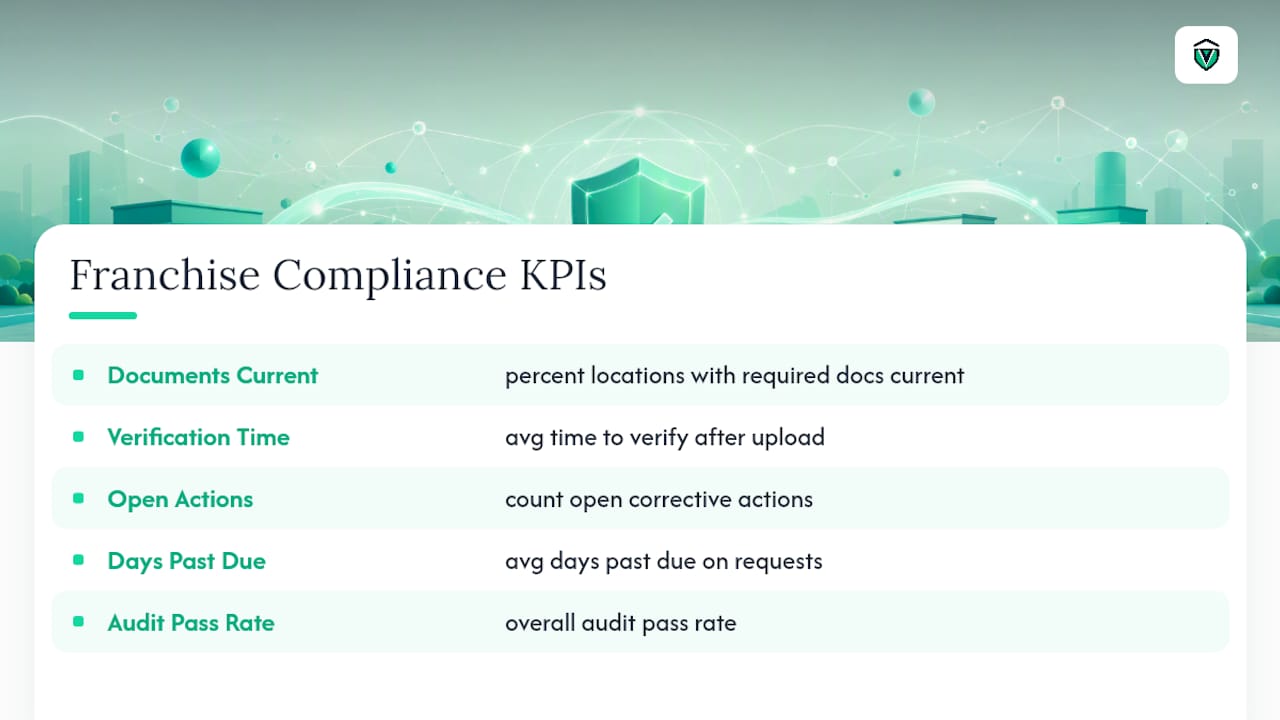
Track the percentage of locations with all required documents current, average time-to-complete verification after upload, the count of open corrective actions at any given moment, average days past due on outstanding requests, and your overall audit pass rate.
On cadence, run operational spot checks quarterly, comprehensive legal and financial audits annually, and event-driven audits whenever there's an ownership change, a major incident, or a customer complaint pattern that suggests a systemic problem. Franchise counsel's recommendation to periodically audit both people and processes, as noted by the American Bar Association, applies here just as much as it does to the initial disclosure process.
Dashboards and heatmaps by region make patterns visible that a spreadsheet buries. If one region consistently lags on permit renewals, that's a training or communication gap worth fixing before it becomes ten separate compliance failures.
How Should You Handle PII When Collecting Documents?
Some compliance documents contain personally identifiable information, background check results, Social Security numbers on tax forms, driver's license copies for permit applications. The rule here is simple: only request PII you'll actually review and use, per data-minimization guidance from privacy researchers at EPIC. Collecting more "just in case" creates liability without adding value.
When you do need PII, tell the franchisee clearly what you're collecting it for, how long you'll retain it, who has access, and how they can request deletion once it's no longer needed. That notice doesn't need to be complicated, a short paragraph on the request form covering those four points is usually enough to meet the spirit of data-minimization best practices.
Security checklist for PII-containing documents:
- Route uploads through a secure, access-controlled portal, never email attachments.
- Encrypt documents both at rest and in transit.
- Restrict access by role, not by default network permissions.
- Log every access event, not just every upload.
- Set a retention schedule that deletes PII once its legal or business purpose expires.
Pro Tip: Before adding any new field to a document request, ask whether you'll actually review it. If the honest answer is "probably not," don't collect it.
Templates You Can Use Right Now
You don't need to build these from scratch. A master document request checklist should map each required document to a reviewer and a retention period, something like: FDD receipt page, reviewed by legal, retained a minimum of three years; certificate of insurance, reviewed by operations, retained through the policy's active period plus one renewal cycle.
A short request email might read: "Please upload your current business license, certificate of insurance, and signed training completion records through the secure portal linked below by [date]. Each document should be uploaded as a separate file named with your location ID. Contact your regional manager with questions."
A verification log needs just five fields to be useful: document name, franchisee or location ID, date received, reviewer name, and verification status (accepted, rejected, pending correction). Add a notes field for anything that needs follow-up context.
- Master checklist: document type, reviewer, retention period.
- Request email: deadline, upload link, naming convention, contact.
- Verification log: document, location, date, reviewer, status, notes.
What Goes Wrong, and How Do You Fix It?
Late uploads are the most common problem, followed closely by partially redacted or illegible documents, franchisee resistance to sharing anything that touches personal information, and mismatched IDs where a signature doesn't match the name on file.
The fix is a clear remediation playbook: define acceptance criteria up front so franchisees know exactly what "complete" looks like, request specific clarifications rather than a vague "resubmit," and set a firm corrective-action deadline, typically 14 days.
If a location still isn't responding, escalate through regional managers for a direct field visit before resorting to formal notices. Reserve a notice of default, withheld co-op fund approval, or temporary suspension of benefits for genuine non-response after multiple good-faith attempts, not as a first move.
How Vaultedai Puts This Workflow Into Practice
Vaultedai centralizes exactly the workflow described above: one portal for document upload, automated reminders tied to deadlines, and AI-powered extraction that pulls key data, expiration dates, license numbers, coverage amounts, directly from uploaded files instead of requiring manual entry.

Franchisors using this kind of centralized system typically see fewer missed renewals, faster verification turnaround since reviewers aren't hunting through email threads, and a single consolidated audit report instead of stitching together records from a dozen regional folders. Every feature maps directly to what franchise counsel and the FTC's own guidance recommend: dated receipts, retained records, and an auditable trail of who submitted what and when.
Pro Tip: When evaluating any compliance platform, including Vaulted, ask to see how it handles a franchisee who misses a deadline. The escalation logic matters as much as the storage.
What Field Experience Teaches About Rolling This Out
Tips that hold up in practice: require a mobile photo option for permits posted on-site, since franchisees rarely have a scanner handy. Require an authorized-submitter field on every upload, no exceptions. Run a monthly digest report instead of checking status ad hoc, it catches drift before it becomes a pattern.
One common rollout bump: franchisees resist a new portal if it feels like extra work with no payoff. The pragmatic fix is a phased rollout, starting with your most engaged locations, then using their smooth experience as proof when rolling out to the rest of the network.
The pattern that consistently separates strong compliance programs from weak ones isn't stricter policy. It's fewer places for a document to get lost.
Ready to Centralize Your Franchise Compliance Documents?
Chasing signed agreements through email and tracking permit expirations on a spreadsheet works fine for three locations. It falls apart at thirty. Vaultedai replaces that scramble with one portal where every franchisee uploads documents, every reminder fires automatically, and every acceptance gets logged with a timestamp you can hand a regulator without notice.
The platform's AI extraction reads permit numbers, expiration dates, and coverage amounts directly off uploaded files, so your reviewers spend time verifying instead of retyping. During onboarding, most franchisors get their full document checklist configured and their first location live within a week, with support mapping your existing categories, permits, insurance, training records, into the system rather than starting from a blank template. Real results from franchise operators already running this workflow are documented in Vaulted's case studies.
If your current process depends on someone remembering to follow up, start a trial and see what it looks like when the system remembers instead.
Frequently Asked Questions
How often should franchisors collect compliance documents from franchisees? Most core documents like permits and insurance need annual renewal verification, but a smart process checks continuously through automated expiration tracking rather than waiting for a scheduled audit to discover a lapse.
What is the fastest way to collect compliance documents from franchisees across many locations? A centralized upload portal with automated reminders beats email every time. Franchisors switching from manual tracking to a dedicated system typically cut verification time significantly because reviewers aren't hunting through scattered inboxes.
Do franchisees have to sign an FDD receipt page? Yes. The signed receipt page is your legal proof of timely delivery under the FTC Franchise Rule's 14-day requirement, and it should be retained as part of your sales and disclosure records.
What happens if a franchisee refuses to submit required compliance documents? Follow an escalation ladder: request clarification first, then set a firm corrective-action deadline, then involve a regional manager for direct follow-up. Formal remedies like withheld approvals or a notice of default come only after good-faith attempts fail.
Can Vaultedai help with franchise compliance document collection specifically? Yes. Vaultedai centralizes document requests, automates renewal reminders, and uses AI to extract key data from uploaded permits, licenses, and insurance certificates, creating the audit trail franchisors need for both internal reviews and regulatory inquiries.
This article is general information, not a substitute for advice from a qualified lawyer. Consult a qualified legal professional about your own circumstances before acting on anything here.
Sources
- Franchise Rule Compliance Guide (FTC)
- Setting Effective Franchise Sales Compliance Program: Tips for In-House Counsel (American Bar Association)
- Data Minimization — Electronic Privacy Information Center (EPIC)
- Franchise agreement annual compliance self-certification template (MangoApps)