
For multi-location convenience store franchises, the right compliance tool is a centralized, mobile-first platform with scoped HQ permissions, automated corrective-action workflows, and jurisdiction-specific templates covering FDA food safety, EPA underground storage tank (UST) rules, and state tobacco/lottery requirements. Vaultedai is built precisely for this. Your next step: run a 30-day pilot across a single district, collect baseline KPIs, and measure time-to-value before a full network rollout.
What that looks like in practice:
- Centralized dashboard tracking permits, licenses, and renewals across every location
- Mobile-first audit checklists with photo evidence and timestamps
- Corrective-action workflows that assign tasks, set deadlines, and verify closure
- Automated renewal reminders so no tobacco license or food permit lapses quietly
- Scoped permissions giving HQ visibility without overriding store-level execution
Table of Contents
- Why do convenience store franchises need a centralized compliance platform?
- Why does Vaultedai fit convenience store franchises specifically?
- How do you roll out a compliance platform across multiple stores?
- What should you budget for, and how do you calculate ROI?
- Key Takeaways
- What franchise compliance actually demands
- Vaultedai makes franchise compliance manageable at scale
- Useful sources and further reading
Why do convenience store franchises need a centralized compliance platform?
Fragmented compliance management is the single biggest operational risk in a multi-location C-store network. A missed tobacco license renewal at one store can trigger a state fine and a brand-level audit. A failed fire suppression inspection at another can close the location for days. When each store tracks permits in a spreadsheet and emails renewal reminders to themselves, the whole system depends on individuals who may turn over next month.
Centralized franchise compliance management solves this at the system level. Instead of chasing documents across email threads, HQ sees every permit status, every upcoming renewal, and every open corrective action on one dashboard. Mobile inspections with photo evidence mean a district manager can complete a scored audit from the forecourt and push a corrective task to the store manager before leaving the parking lot.
The compliance domains that matter most for C-stores:
- OSHA workplace safety standards covering hazard communication, emergency procedures, and training records per OSHA guidelines
Statistic callout: Operators who move from fragmented tools to a single compliance platform typically consolidate multiple separate systems, including spreadsheets, email reminders, paper checklists, and standalone document folders, into one dashboard. The reduction in administrative overhead alone often justifies the subscription cost within the first quarter.
The National Association of Convenience Stores (NACS) consistently flags age-restricted product compliance and POS-linked lottery rules as the highest-frequency audit triggers in the sector. High clerk turnover makes this worse: a new hire who hasn't been certified before their first solo shift is a liability, not just a training gap.
Questions to ask every vendor
- Can HQ push checklist updates to all locations instantly, or does each store configure independently?
- How are corrective actions assigned, tracked, and verified closed — and what's the evidence trail?
- Do you have state-level tobacco, lottery, and food service permit templates pre-built?
- What integrations exist with common C-store POS systems and payroll platforms?
- What is the typical time-to-value for a 20-store pilot?
Red flags to walk away from
- Audits treated as file storage with no corrective-action workflow
- No role-based permission scoping between HQ and store level
- Mobile app that requires constant connectivity
- No automated renewal reminders or expiration tracking
- No photo evidence or timestamp trail for audit findings
Pro Tip: Before your vendor demo, pull three recent compliance incidents from your network — a missed renewal, a failed inspection, and a repeat corrective-action failure. Walk the vendor through each scenario and ask them to show you exactly how their platform would have caught and resolved it. The demo tells you everything.
A pilot that enforced corrective-action verification at a 12-store district caught a recurring cooler temperature logging failure that had passed paper audits for months. The platform's photo-timestamp requirement exposed the gap before a health inspection did.
Why does Vaultedai fit convenience store franchises specifically?
Vaultedai is built to centralize permits, automate renewals, extract document data with AI, and scope permissions cleanly between franchise HQ and field teams. That combination is what separates it from generic document management or single-location audit apps.
Core features mapped to franchise needs:
- Audit checklists — configurable by jurisdiction, store type, and compliance category
- Jurisdiction-specific templates — covering FDA food safety, EPA UST operator certification, and state tobacco/lottery requirements per the Convenience Store License Requirements Checklist 2026
Vaultedai case studies document outcomes including reduced missed renewals, faster corrective-action closure rates, and improved audit completion across multi-location rollouts.
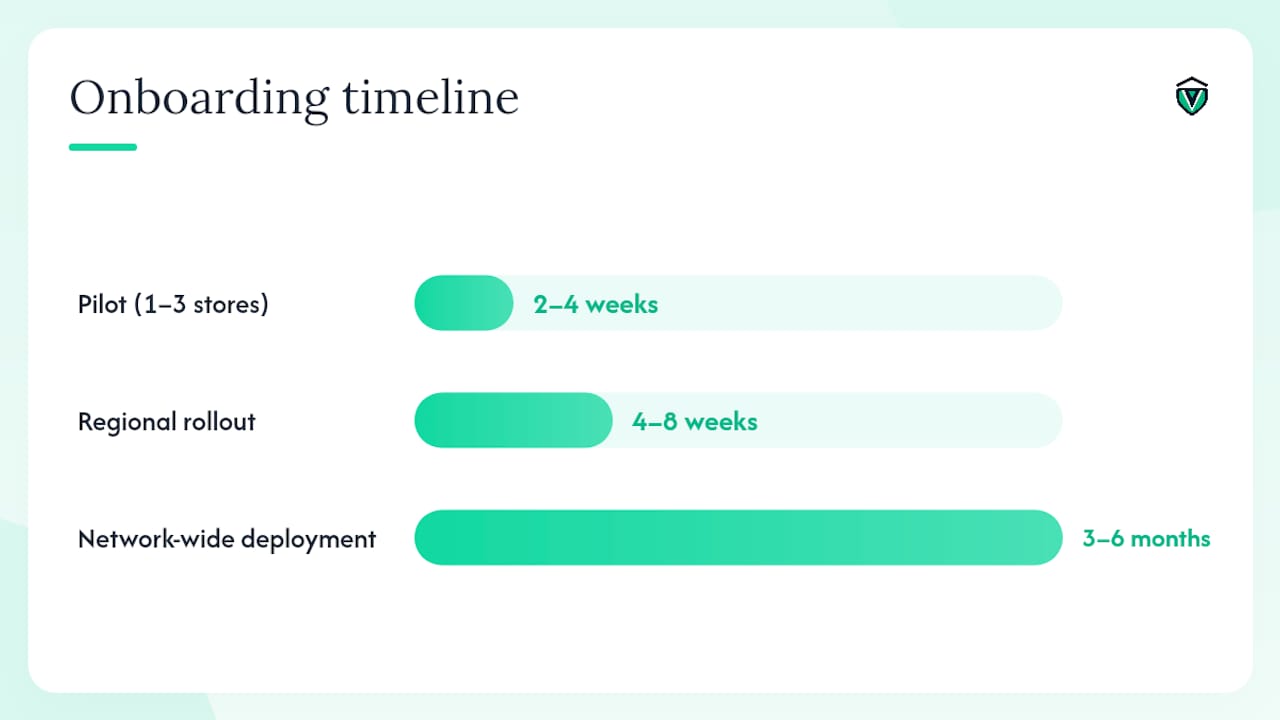
Typical onboarding timeline
| Phase | Duration | Key activities |
|---|---|---|
| Pilot (1–3 stores) | 2–4 weeks | Template setup, user roles, first audit cycle |
| Regional rollout | 4–8 weeks | District training, integration testing, KPI baseline |
| Network-wide deployment | 3–6 months | Full location onboarding, HQ dashboard live |
A state tobacco/lottery checklist in Vaultedai, for example, stores the license document, tracks the renewal date, logs employee age-verification training records, and timestamps every audit finding — all linked to the specific location and permit class.
Pro Tip: Use the AI document extraction feature during onboarding to bulk-upload existing permits. It pulls expiration dates and permit numbers automatically, cutting the initial data-entry phase from days to hours.
How do you roll out a compliance platform across multiple stores?
A staged pilot reduces risk and proves ROI before you commit the full network.
- Map critical compliance categories — list every permit class, audit type, and renewal cycle across pilot stores using the multi-unit franchise permit types guide.
- Configure templates — build jurisdiction-specific checklists for FDA, EPA UST, tobacco, fire suppression, and OSHA items.
- Train pilot stores — focus on mobile audit workflow, corrective-action submission, and document upload. Per NACS guidance, keep training shift-compatible and role-specific given high clerk turnover.
Role responsibilities at a glance:
What should you budget for, and how do you calculate ROI?
Budget depends on three variables: number of locations, feature depth (audit complexity, integrations, AI extraction), and support level. Most enterprise compliance platforms price per location on a monthly subscription, with tiered plans that add integrations and advanced features at higher tiers. Onboarding professional services are often a separate line item for networks above 20 stores.
Pricing factors to scope:
- Number of active locations and users
- Audit frequency per location per month
- Number of integrations (POS, payroll, inventory)
- AI document extraction volume
- Onboarding and training support hours
A simple ROI calculation for a 25-store network:
- Avoided fines: one missed tobacco license renewal fine per year, avoided across 25 stores
- Labor reclaimed: automated renewal reminders and digital audits reduce compliance admin time per location per month
- Reduced repeat failures: corrective-action workflows with photo verification cut repeat noncompliance incidents
Permit tracking's role in franchise scaling shows how the ROI case strengthens as location count grows, because the administrative overhead of manual tracking scales linearly while a platform cost does not.
Statistic callout: The permit and license workload for a 25-store C-store network typically spans dozens of permit classes per location — food service, tobacco, lottery, UST operator certification, fire suppression, and business licenses — each with different renewal cycles and jurisdiction-specific documentation requirements. Tracking that manually across locations is where renewals get missed.
During the pilot, collect these baseline metrics before go-live: current audit completion rate, average days-to-closure for open corrective actions, number of permit renewals missed or late in the past 12 months, and total staff hours spent on compliance admin per week.
Key Takeaways
The most effective compliance software for convenience store franchises combines centralized permit tracking, mobile-first audits, automated corrective-action workflows, and jurisdiction-specific templates — all scoped for HQ oversight and store-level execution.
| Point | Details |
|---|---|
| Centralize first | One dashboard for all permits, renewals, and audit findings eliminates the missed-renewal risk that fragmented tools create. |
| Scope permissions correctly | HQ needs full visibility; store managers need execution tools — the platform must support both without conflating them. |
| Corrective actions need closure loops | Findings that don't auto-generate assigned tasks with deadlines and photo verification will repeat. |
| Pilot before full rollout | A 2–4 week pilot across 3–5 stores proves ROI and surfaces template gaps before network-wide deployment. |
| Vaultedai for franchise networks | Vaultedai centralizes permits, automates renewals, provides AI document extraction, and scopes HQ and field permissions for multi-location C-store franchises. |
What franchise compliance actually demands
Most operators underestimate how much of their compliance risk lives in the gap between "we have a checklist" and "we can prove every item was completed, corrected, and closed." Regulators don't care that you intended to renew the tobacco license. They care whether you did, and whether you can show the date, the document, and the training record that goes with it.
The balance between HQ control and franchisee autonomy is where most compliance programs break down. HQ wants uniformity; franchisees want flexibility. The answer isn't to pick one — it's to scope permissions so HQ sets the policy and franchisees execute it, with the platform enforcing the evidence trail on both sides.
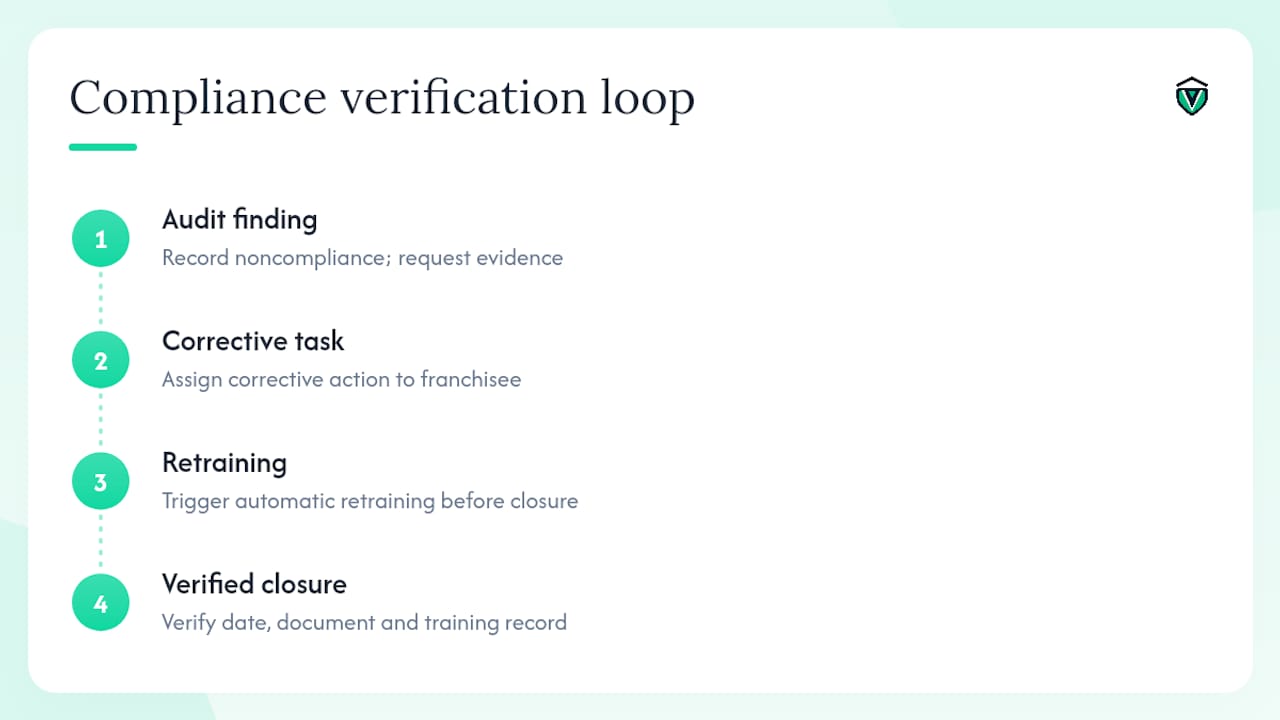
One thing that consistently reduces repeat failures: when a noncompliance is recorded, trigger a retraining requirement automatically before the corrective action is marked closed. It turns a one-time fix into a durable behavior change. That loop — audit finding, corrective task, retraining, verified closure — is what separates compliance programs that hold up under inspection from ones that look good on paper.
Vaultedai makes franchise compliance manageable at scale
Running compliance across 10, 25, or 50 convenience store locations without a purpose-built platform means someone is manually tracking dozens of permit expiration dates, chasing corrective actions by email, and hoping nothing lapses before the next state inspection. Vaultedai replaces that with a centralized system where every permit, audit, and corrective action is tracked, automated, and scoped for your team's roles.
A typical 30-day pilot with Vaultedai proves three things: how many permits were at risk of lapsing, how long corrective actions were sitting open, and how much admin time the platform reclaims per week. Those three numbers make the ROI case for a full rollout without any guesswork.
Start your pilot with Vaultedai and see what your network's compliance posture actually looks like.
Useful sources and further reading
- Occupational Safety and Health Administration (OSHA)
- National Association of Convenience Stores (NACS)
- Vaulted | AI Business Permit Tracker & Compliance Fortress
- Vaulted case studies
- Multi-Unit Franchise Permit Types: 2026 Compliance Guide