
Mobile permit management moves permit requests, approvals, evidence capture, and renewals off paper and desktop software and onto phones and tablets, letting field crews issue, update, and close permits without a trip back to the office. The payoff shows up fast: quicker issuance, on-site enforcement, and far fewer renewals that slip through the cracks. If you're evaluating this shift, don't start with a full rollout.
- Run a pilot on one permit type with one crew over a limited trial period.
- Track time-to-issue and renewal compliance before you scale, focusing on key performance indicators recommended by industry groups.
- Migrate existing templates rather than redesigning forms from scratch.
Key Takeaways
Mobile permit management works when offline-first design, role-based approvals, and evidence capture combine into one auditable field workflow instead of a digitized paper form.
| Point | Details |
|---|---|
| Start with a narrow pilot | Test one permit type with one crew over a limited trial period before scaling. |
| Prioritize offline sync | Confirm conflict resolution behavior before committing, since field connectivity is rarely reliable. |
| Migrate templates first | Import existing permit forms rather than redesigning them during the pilot phase. |
| Measure the right KPIs | Track key performance indicators such as time-to-issue, inspection turnaround, and renewal compliance to evaluate effectiveness. |
| Vaulted centralizes the record | Vaulted maps permits, renewals, and mobile access into one system built for fast onboarding. |
Table of Contents
- What Does Mobile Permit Management Actually Include?
- What Features Should You Look for in a Pilot or RFP?
- How Do You Choose the Right Mobile Permit Solution for Your Scale?
- How Should You Roll Out a Mobile Permit System Without Disrupting Field Work?
- Where Does Mobile Permit Management Deliver the Clearest Value?
- How Vaulted Maps to This Checklist
- Why Vendor Comparisons Miss the Real Adoption Problem
- Get Field-Ready Permit Tracking Without the Spreadsheet Chaos
- Frequently Asked Questions
- Sources
What Does Mobile Permit Management Actually Include?
Mobile permit management isn't just a permit database with a phone-friendly login screen. It's a shift in where work happens. Instead of a crew lead calling the office to check permit status, the answer is on their device, updated in real time.
The core capability set looks like this:
- Mobile forms with conditional logic that hide or reveal fields based on permit type, so a confined-space permit doesn't ask the same questions as a mobile vending permit.
- Approval routing that pushes a request to the right supervisor automatically, based on role and location.
- Offline sync that lets a crew fill out a hot-work permit in a basement with no signal, then syncs the moment they're back in range.
- Photo, GPS, and signature capture attached directly to the permit record, timestamped and geotagged.
- Audit trails that log every status change, approval, and edit for inspection or dispute later.
What doesn't move to mobile, at least not entirely: complex jurisdictional filings, fee reconciliation, and anything requiring a wet-ink signature under local law. Those still route through office staff or a municipal portal, but the field-facing work, the forms, photos, and approvals, moves to the crew's pocket.
What Features Should You Look for in a Pilot or RFP?
Before you sign anything, run the vendor through a checklist built around how permits actually break down in the field, not how they look in a demo.
- Offline-first operation with defined conflict resolution. If two supervisors edit the same permit while offline, what happens when both come back online? Get a straight answer, not a vague "it syncs."
- Conditional logic and validation that block a permit from advancing if a required photo or signature is missing, the way mobile forms platforms use prepopulation and validation to cut inspection errors.
- Role-based routing with expiry rules and escalation, so a permit that sits unapproved for 48 hours automatically flags a backup approver.
- Rich evidence capture, including annotated photos, GPS pins, and digital signatures tied to the permit record, a baseline feature in most modern permit and work-permit apps.
- Exportable audit logs in formats your compliance or legal team can actually use, plus integration hooks for other systems.
- Security controls: encryption at rest and in transit, single sign-on, and permissions that scope by role and location, not a single shared login for the whole crew.
Pro Tip: Ask the vendor to show you the offline sync behavior live, not in a slide. Turn on airplane mode, fill out a permit, then reconnect and watch what actually happens to the data.
Enterprise-grade tools also tend to preserve desktop-level detail on mobile. Some enterprise compliance apps let a supervisor review and escalate a flagged request from a phone with the same data depth they'd get at a desk, which matters once you're managing permits across more than one site.

How Do You Choose the Right Mobile Permit Solution for Your Scale?
The right approach depends less on features and more on how many locations, crews, and jurisdictions you're juggling.
- Match the tool to your footprint. A single site with a handful of recurring permits needs something simpler than a 40-location franchise group managing five different city requirements.
- Weigh onboarding speed against template migration. A platform that imports your existing permit forms gets crews working in days; one that forces a redesign can stall a pilot for weeks.
- Check integration needs early. If your team already relies on GIS mapping, payroll systems, or a document repository, confirm the mobile tool can feed data into those systems rather than becoming a fifth silo.
- Calculate total cost of ownership, not just the subscription. Factor in device management, training time, and any per-user fees that scale awkwardly as you add locations.
- Set pilot success metrics before you start, not after. Industry groups tracking online permitting rollouts recommend measuring time-to-issue, inspection turnaround, and renewal compliance as the core KPIs that separate a real improvement from a shinier interface.
A pilot that can't show movement on key performance metrics within several weeks probably isn't the right fit, regardless of how polished the app looks.
How Should You Roll Out a Mobile Permit System Without Disrupting Field Work?
Start narrow. A pilot scoped to one permit type and one crew, run over four to six weeks, gives you clean data without disrupting daily operations. Trying to convert every permit type across every location on day one is the single most common way these rollouts stall.
- Migrate your current permit templates as-is for the pilot. Redesigning forms before you've validated the workflow just adds variables you can't isolate later.
- Set clear approval SLAs (24 hours, 48 hours) and train supervisors specifically on mobile approval steps, not just the app's general interface.
- Define offline expectations upfront: which crews will regularly work without signal, and what device settings or storage they'll need.
- Assign one person to own template migration and training so questions don't stall in a group chat.
Pro Tip: Give your pilot crew a direct line to whoever owns the rollout. The fastest fixes come from a supervisor texting "this field won't save" the same afternoon it happens, not a support ticket filed a week later.
Once your pilot clears its KPI targets, expand by permit type first, then by location. Tackling both dimensions at once is how pilots quietly turn into year-long projects. For a structured path through this, a standardized permit management process helps keep templates and approvals consistent as you scale.

Where Does Mobile Permit Management Deliver the Clearest Value?
Some permit types show returns almost immediately once they move to mobile:
- Construction and utilities: hot work and confined space permits benefit most from instant evidence capture, since a photo taken on-site at the moment of approval holds up far better in an audit than a form filled out later from memory.
- Multi-location retail and food service: mobile vending permits and health inspection readiness improve when a manager can pull up current permit status during a surprise inspection instead of calling a corporate office.
- Franchises and chains: centralized visibility across dozens of locations, tracked in one system, replaces the spreadsheet-per-location patchwork that makes renewal deadlines easy to miss.
- Municipal operations: cities that shifted permitting online, like Mobile's permitting portal, show how citizen submissions and inspector fieldwork both speed up when status checks happen on a phone instead of a counter visit.
How Vaulted Maps to This Checklist
Vaultedai was built around the exact gap this article covers: field teams that need mobile access, and operations leaders who need everything to land in one auditable system. Vaulted centralizes permits, licenses, and renewal deadlines across every location, with automated reminders that catch expirations before they become violations.
- Fast onboarding, typically measured in days, built around migrating your existing permit templates rather than rebuilding them.
- Mobile and cloud access so field staff and office compliance leads see the same real-time record.
- AI-powered document data extraction that pulls key dates and requirements from permits you already have on file.
- Jurisdiction-specific compliance checklists for multi-location operators managing different requirements city to city.
Multi-location businesses that outgrow spreadsheets don't need a heavier system. They need one place where every permit, every location, and every deadline shows up before it becomes a problem.
Start with a pilot on your highest-risk permit type through the Vaulted platform.
Why Vendor Comparisons Miss the Real Adoption Problem
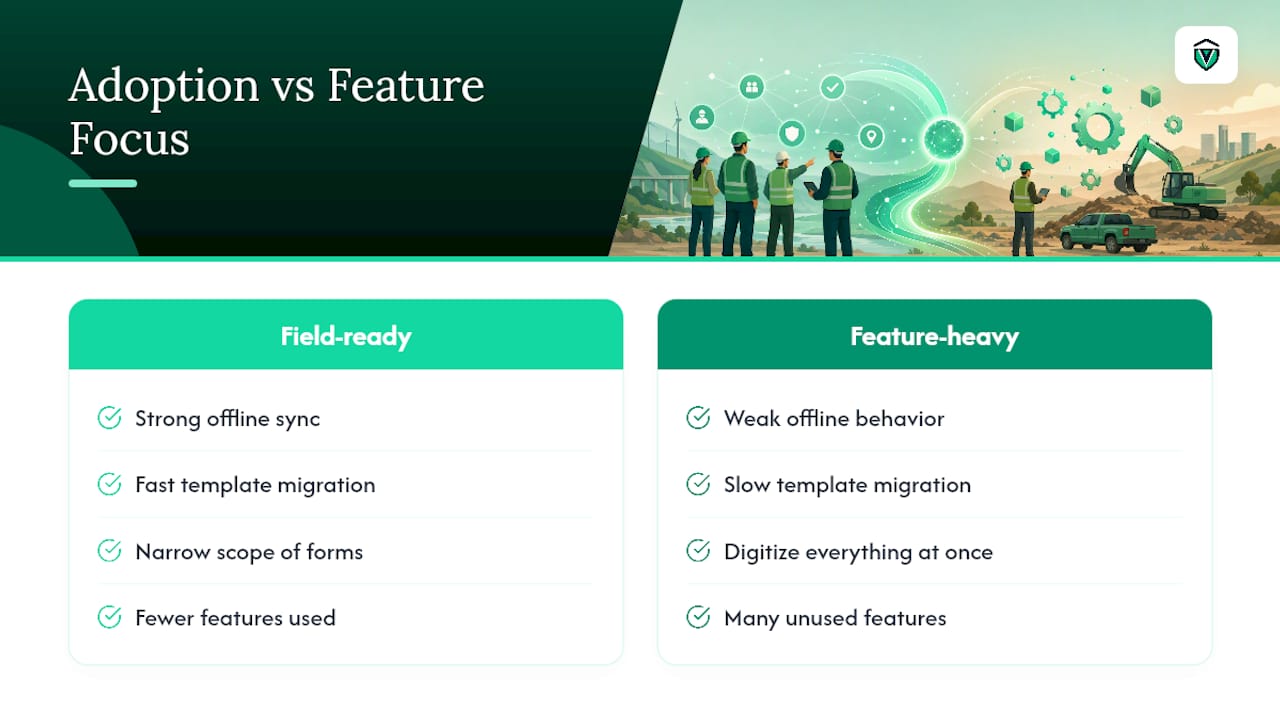
Most guidance on mobile permit management treats it as a feature race: whoever has the longest checklist wins. That's backward. The pilots that succeed aren't the ones with the most capabilities switched on; they're the ones scoped narrowly enough to produce clean data in a month, with one person accountable for template migration and training.
The conventional advice to "digitize everything at once" is where most rollouts lose momentum. Crews resist tools that force them to relearn a form they already knew on paper. The stronger move, backed by how offline-first adoption actually plays out in the field, is to migrate what already works and only redesign after the pilot proves the workflow.
If you take one thing from this guide, prioritize offline sync behavior and template migration speed over the length of a features list. A platform with fewer bells and whistles that your crew actually uses beats a comprehensive one that sits unopened after week two.
Get Field-Ready Permit Tracking Without the Spreadsheet Chaos
Vaultedai gives multi-location operators, franchise groups, restaurant chains, smoke shop networks, and convenience store operators, one centralized system for permits, licenses, and renewals, instead of a folder of spreadsheets nobody trusts. Compared to building a mobile workflow from scratch or stitching together a municipal portal with manual tracking, Vaulted onboards fast, migrates your existing permit templates instead of forcing a redesign, and uses AI-powered document extraction to pull deadlines automatically from permits you already have on file.
If you manage compliance across more than one location and you're tired of finding out a permit lapsed after an inspector points it out, this is the fit. Start a pilot with your highest-risk permit type and see your renewal deadlines in one dashboard within days at Vaultedai.
Frequently Asked Questions
What is mobile permit management? Mobile permit management is the practice of handling permit requests, approvals, evidence capture, and renewals through a phone or tablet instead of paper forms or desktop-only software, so field teams can issue and close permits on-site.
How is mobile permit management different from a permit management app? A permit management app is the tool; mobile permit management is the broader workflow shift, covering how approvals route, how evidence gets captured, and how offline work syncs back to a central record.
Do mobile permit systems work without internet access? The stronger platforms support offline-first operation, letting crews complete forms without a signal and sync automatically once reconnected, though conflict resolution behavior varies by vendor.
How long does it take to onboard a mobile compliance app? Onboarding speed depends heavily on whether the platform can import existing permit templates. Migrating current forms typically gets a pilot crew working within days rather than weeks.
What should a pilot measure before a full rollout? Track time-to-issue, inspection turnaround, and renewal compliance rate over four to six weeks, the same benchmarks local business groups recommend for validating any permitting technology change.
Sources
Municipal examples cited above include Mobile's permitting portal, the city's online case tracking system, and Vaulted's platform as the recommended next step.